AI Whiteboard Video: From Script to Final Cut in 6 Steps
Make an AI whiteboard video from script to final cut: keep each lesson short, check the storyboard and cost before rendering, then edit and translate in chat.
Are you still placing drawings on a timeline one by one, only to redo the module when one slide changes? An AI whiteboard video turns that around: the AI drafts the plan, and you check it.
Synthesys started in 2020 with AI voice generation, and e-learning is where it began. Course creators narrated lessons with our AI voices long before we made video. What they want now is to change one scene without remaking the whole module. This guide walks through the workflow from script to final cut.
What is an AI whiteboard video?
An AI whiteboard video is a narrated explainer in a hand-sketched style. AI writes the script, plans the scenes, draws them and voices them. Your job moves from placing and timing drawings to checking a plan. You still own the teaching: the topic, the order and the facts.
Classic whiteboard software works scene by scene. In VideoScribe's own guide, you choose how each element arrives and align drawings with the narration on the timeline (VideoScribe, checked 14 Oct 2026).
An AI video agent works from a brief instead. Synthesys is an AI video agent that replaces traditional video production end to end. You name the look, "Whiteboard", and every scene follows it (Synthesys, checked 14 Oct 2026). For the wider idea, read what an AI video agent is.
| Timeline whiteboard software | AI video agent (Synthesys) | |
|---|---|---|
| Starting point | A blank project or template | A one-sentence brief |
| Script | You write it, or use an AI script helper | Drafted from the brief, editable |
| Scenes and drawings | You place and animate each element | Planned on a storyboard you review |
| Timing to narration | You align it on a timeline | Done for you, changed by chat |
| Voice | Record your own or use an AI voice | 400+ voices, or your cloned voice |
| Changing one scene later | Edit the project and re-export | Edit that one scene by chat |
Do whiteboard animations actually help people learn?
There's reasonable evidence they help. A 2016 experiment found a learning benefit for whiteboard animation over slides, a filmed lecture, audio and text. A large edX study also found hand-drawn tablet tutorials more engaging than slides. Neither study tested AI-made whiteboard videos.
In the first study, 568 people recruited online watched social science lessons in one of five formats. The authors report "a benefit of whiteboard animations in terms of learning and subjective experiences of enjoyment and engagement" (Turkay and Mouton, MIT LINC 2016).
The second study looked at 6.9 million video sessions across four edX courses. It found "Khan-style tablet drawing tutorials are more engaging than PowerPoint slides or code screencasts" (Guo, Kim and Rubin, L@S 2014). That's an instructor drawing live, which is close to the whiteboard look but not the same thing.
I don't have a clean A/B test to share, so I won't pretend I do. My view: whiteboard works when the idea has a shape you can draw, like a process, a curve or a before and after. A talking head works better when trust in the person is the point, like a coach's welcome video.
How long should a whiteboard explainer video be?
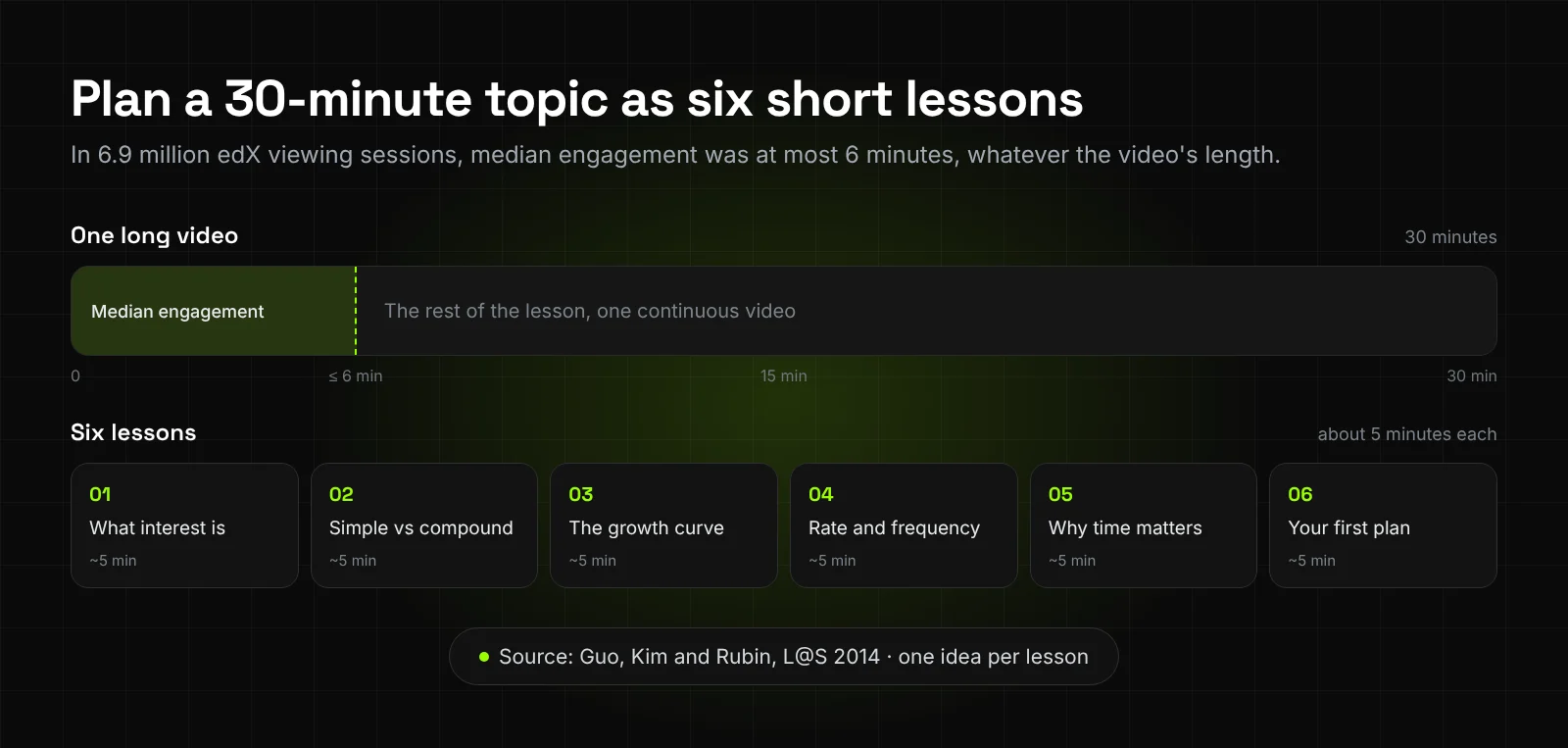
For lessons, keep each video under 6 minutes. In the edX data, median engagement time was at most 6 minutes, whatever the video's total length. So a 30-minute topic is better planned as six lessons of about 5 minutes each.
The researchers' advice was to "segment videos into chunks shorter than 6 minutes" during lesson planning (Guo, Kim and Rubin, 2014). They also found students engaged more when instructors spoke fairly fast and with enthusiasm. Speaking rates in the data ranged from 48 to 254 words per minute.
On Synthesys, a whiteboard explainer typically runs 1 to 10 minutes. Videos can run to 30 minutes (Synthesys). If you need a long one, our guide to making long AI videos covers the planning.
I'd still make one long video when the audience has already committed to it. Think of a webinar replay, a recorded workshop, or a module people watch on purpose. Even then, add chapters so people can jump. For anything people find on their own, split it.
How do you make an AI whiteboard video, step by step?
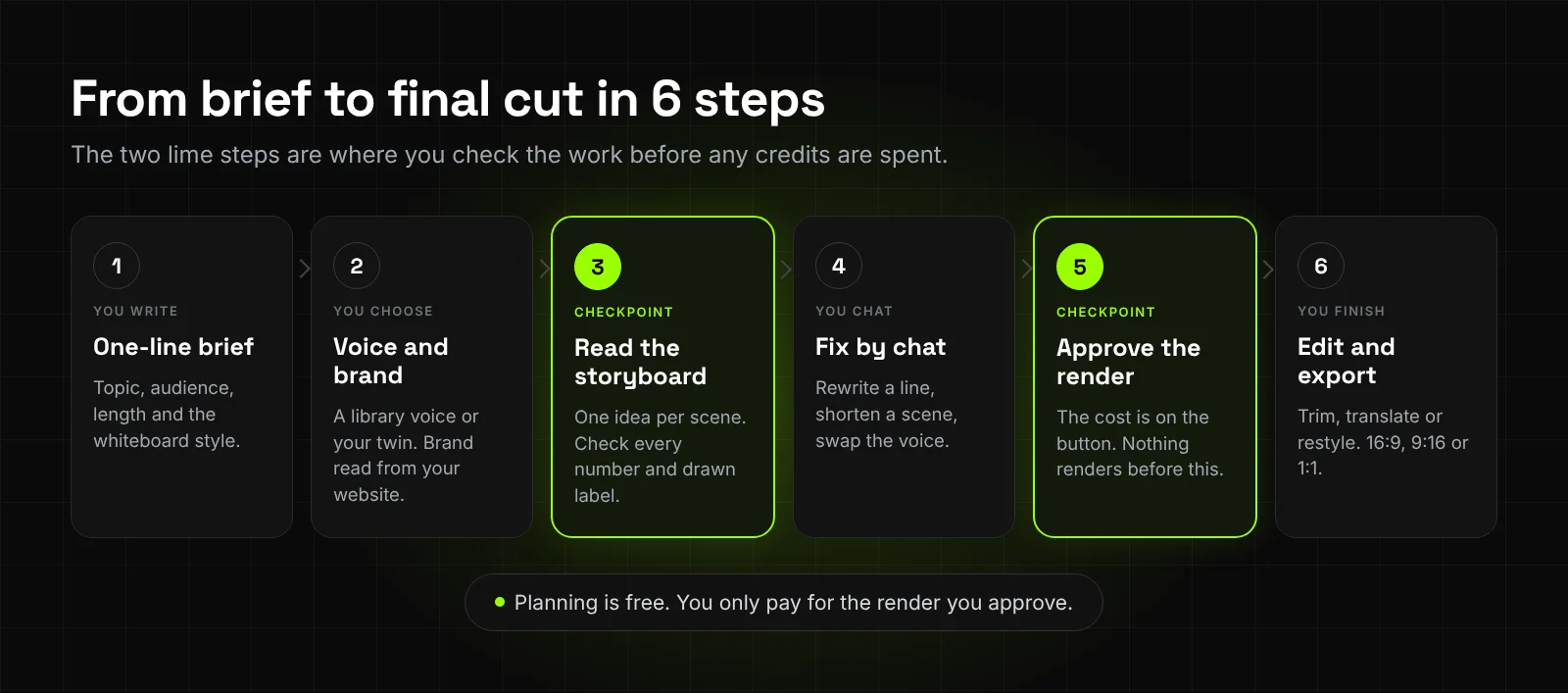
Write a brief, add your voice or brand, and read the storyboard. Fix it by chat, approve the render with the cost shown, then edit and export. Script changes by chat cost nothing in Synthesys, so fix the words before you pay for pictures and the render.
-
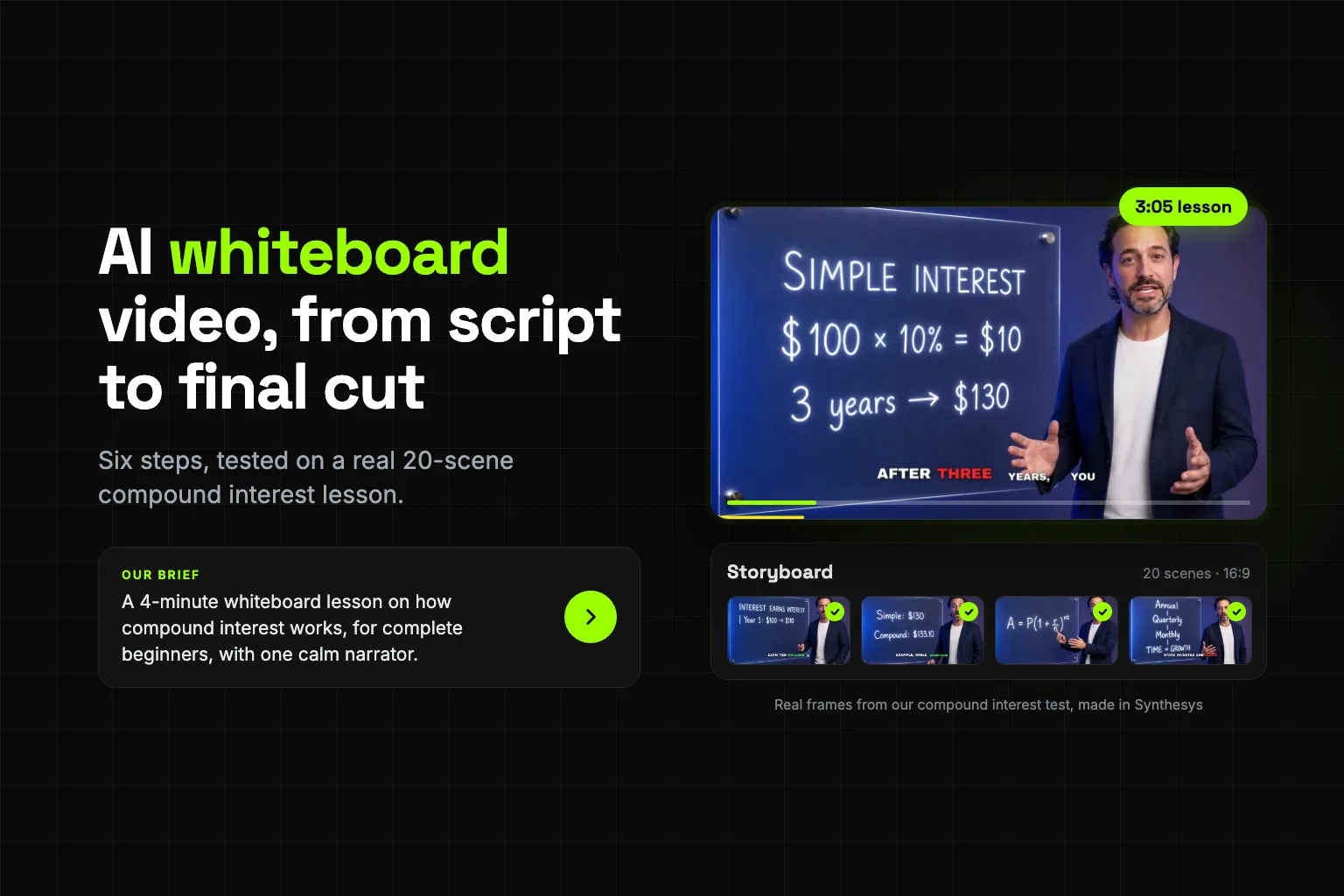
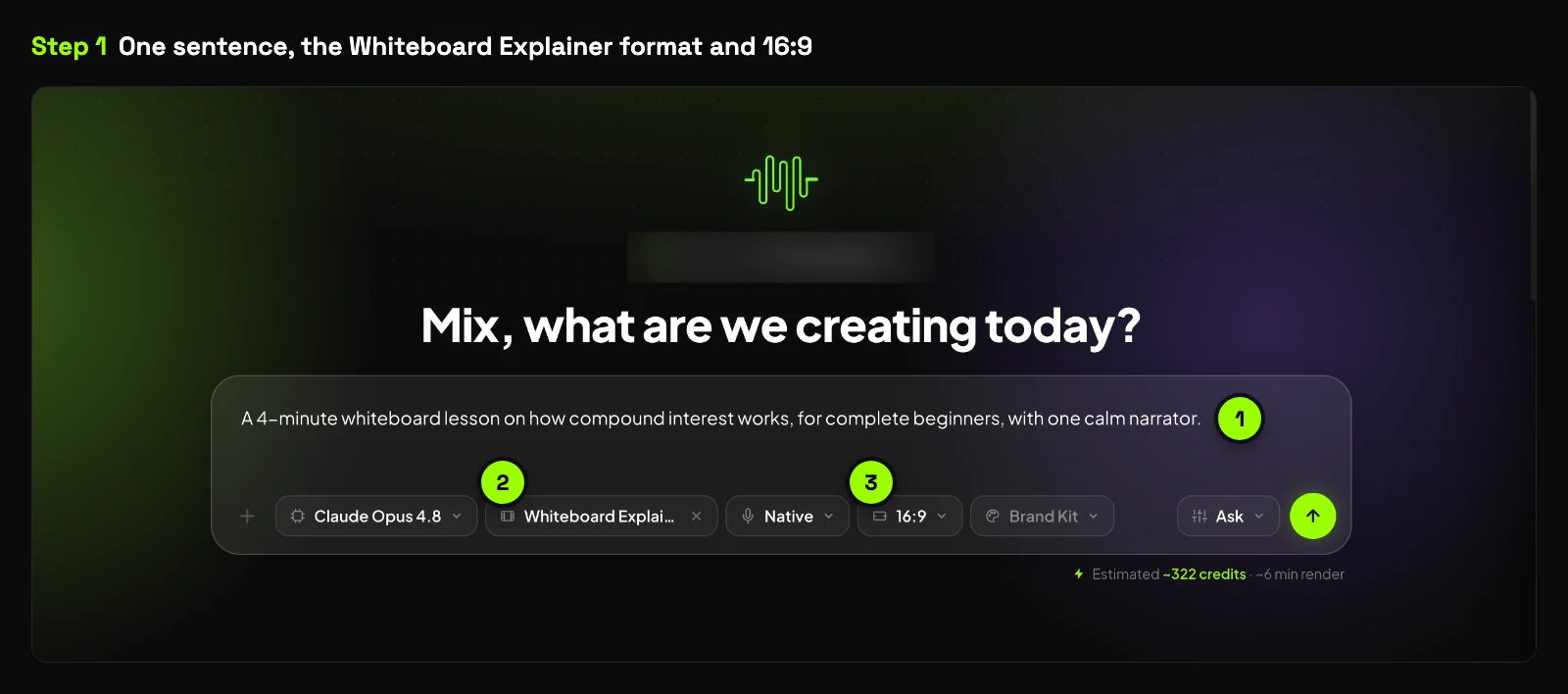
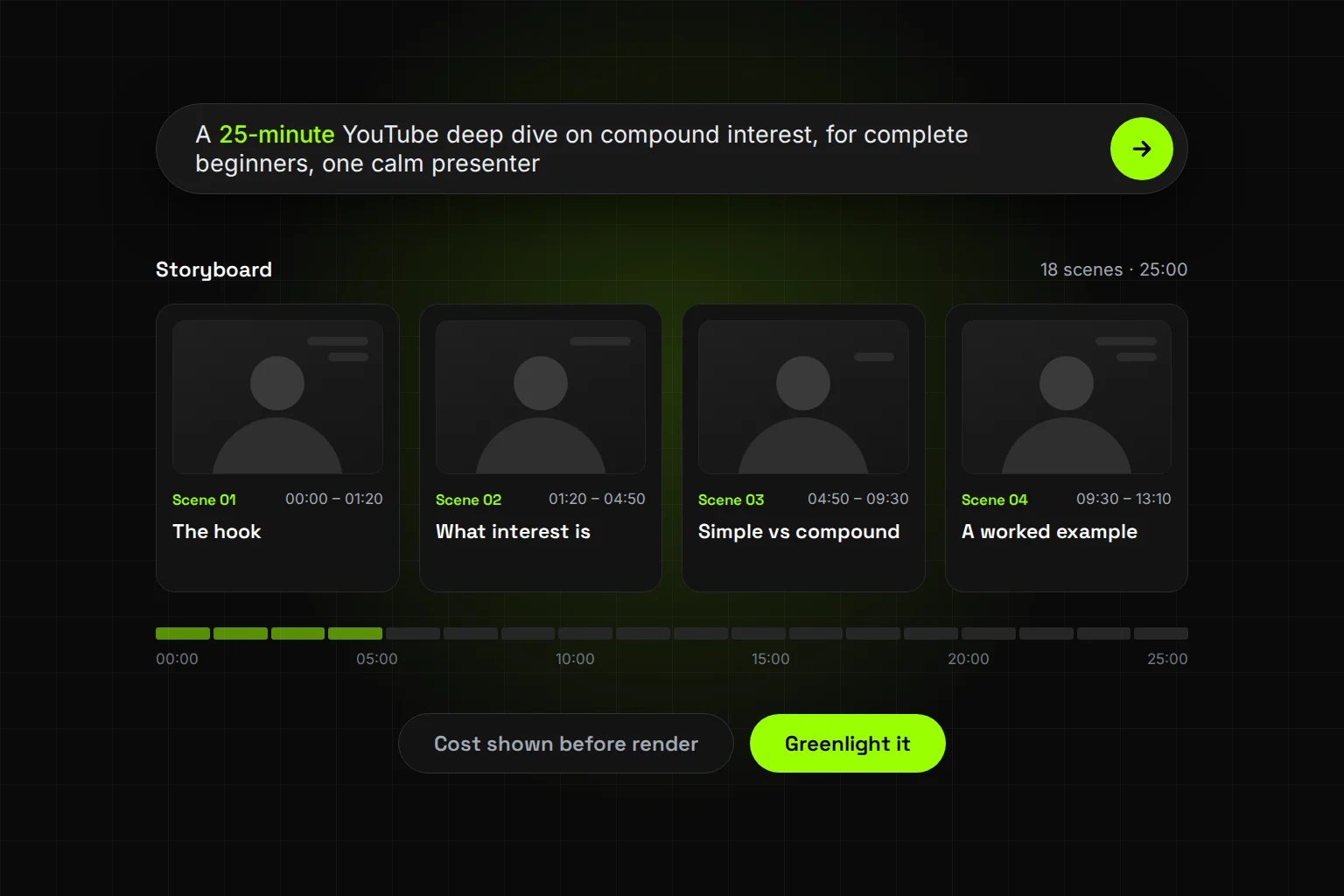
Write a one-sentence brief. Name the topic, the audience, the length and the whiteboard style. For example: "A 4-minute whiteboard lesson on how compound interest works, for complete beginners, with one calm narrator." A sentence is enough. You can also attach a script.
-
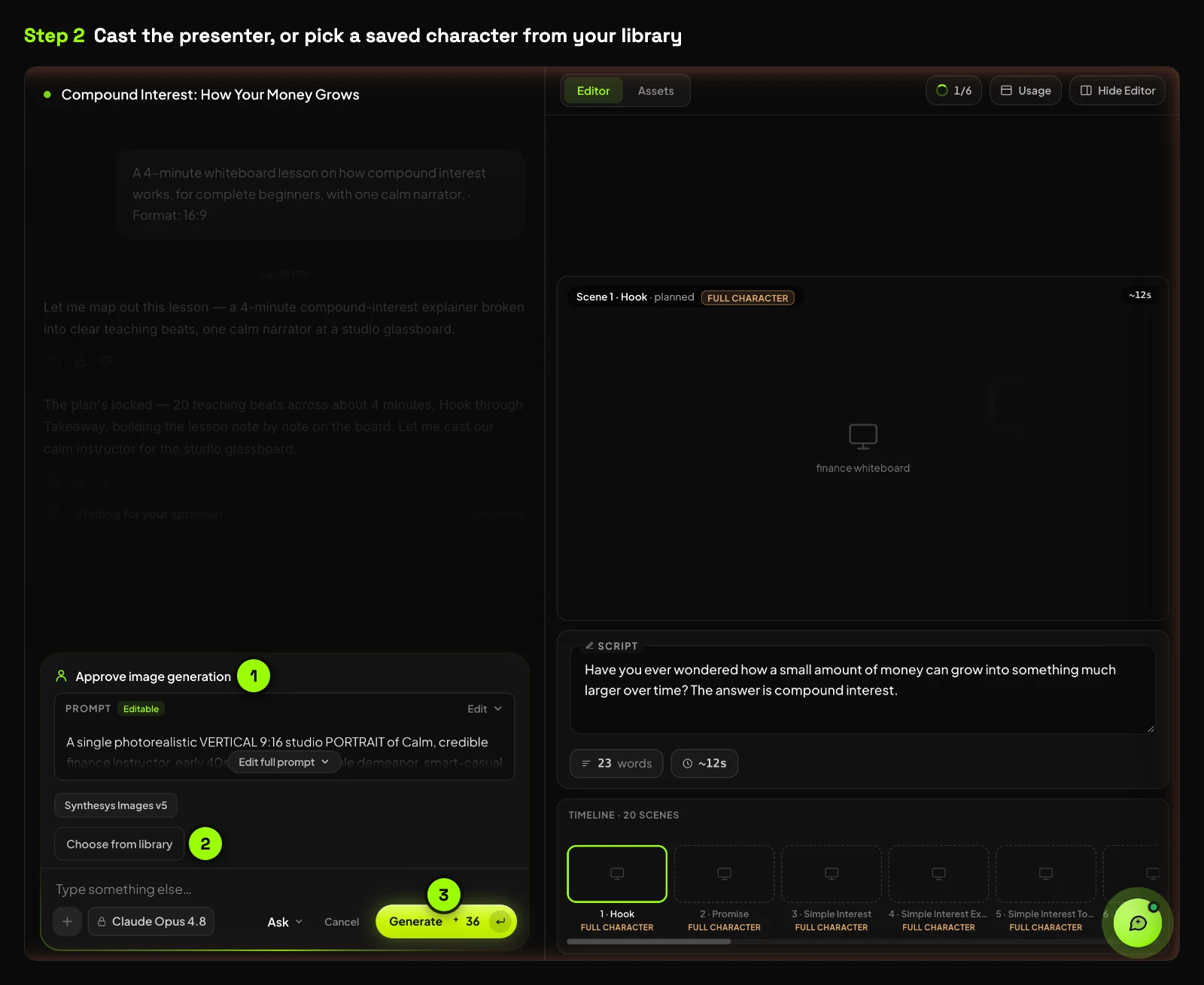
Add the voice and brand. Pick from 400+ library voices, or film one short clip to build a twin with your face and cloned voice. Paste your website address and the agent reads your logo, colours and fonts (Synthesys). In the Whiteboard Explainer format, the agent also casts a presenter who stands at the board. You can generate one or pick a saved character from your library.
-
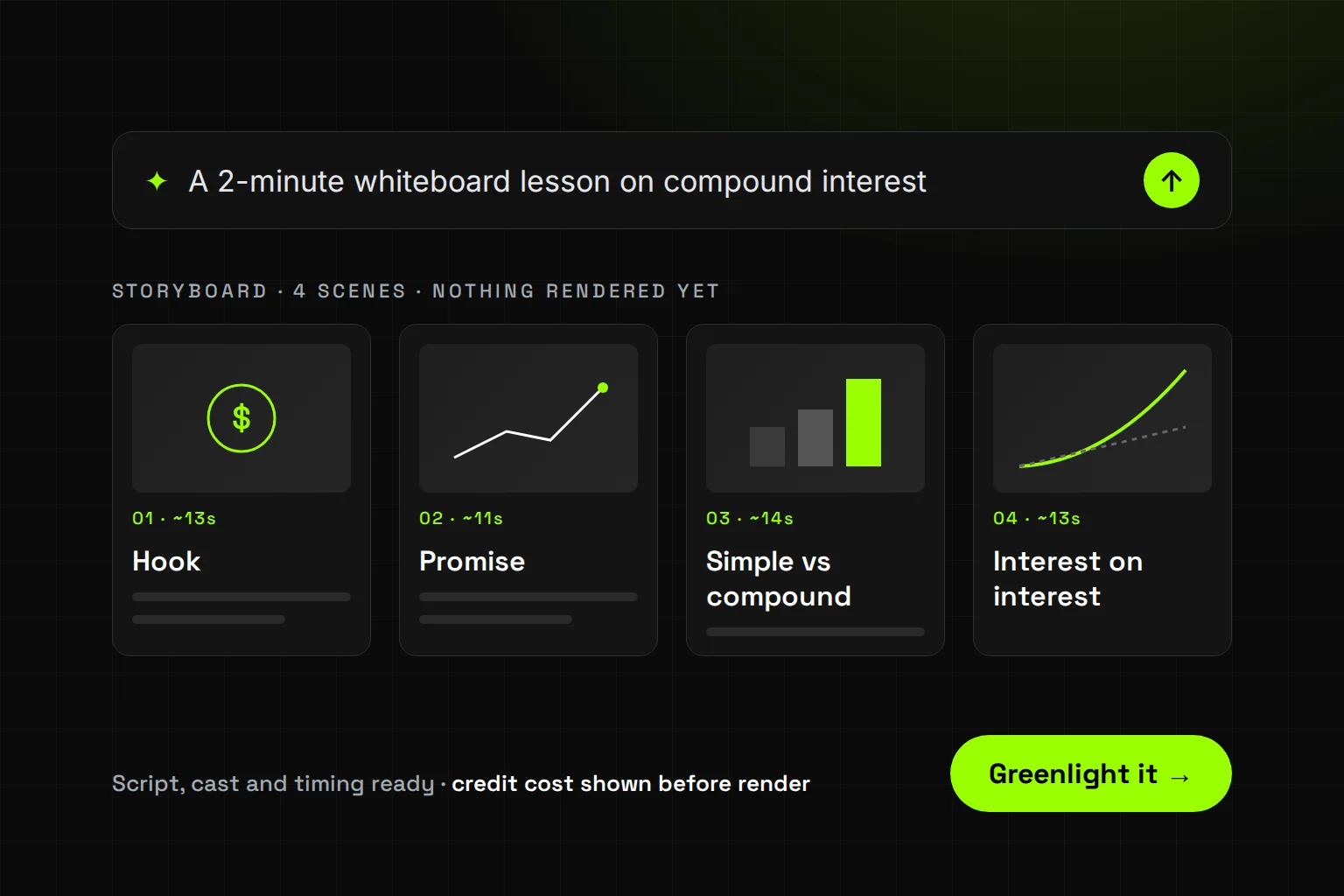
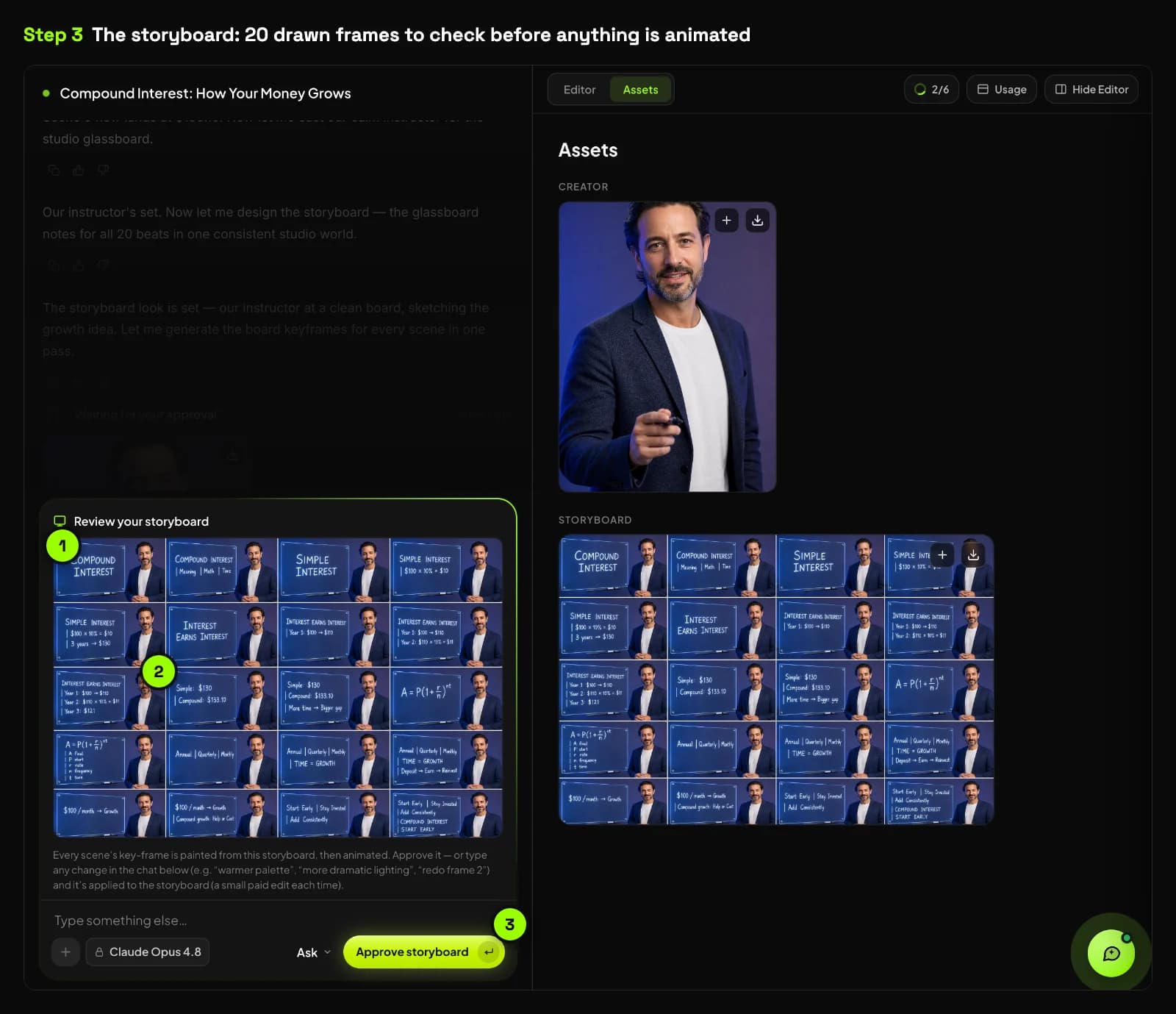
Read the storyboard scene by scene. Check that each scene teaches one idea and that every number and drawn label is right. When a choice would change the outcome, the agent pauses and offers about four options plus a blank line for your own.
-
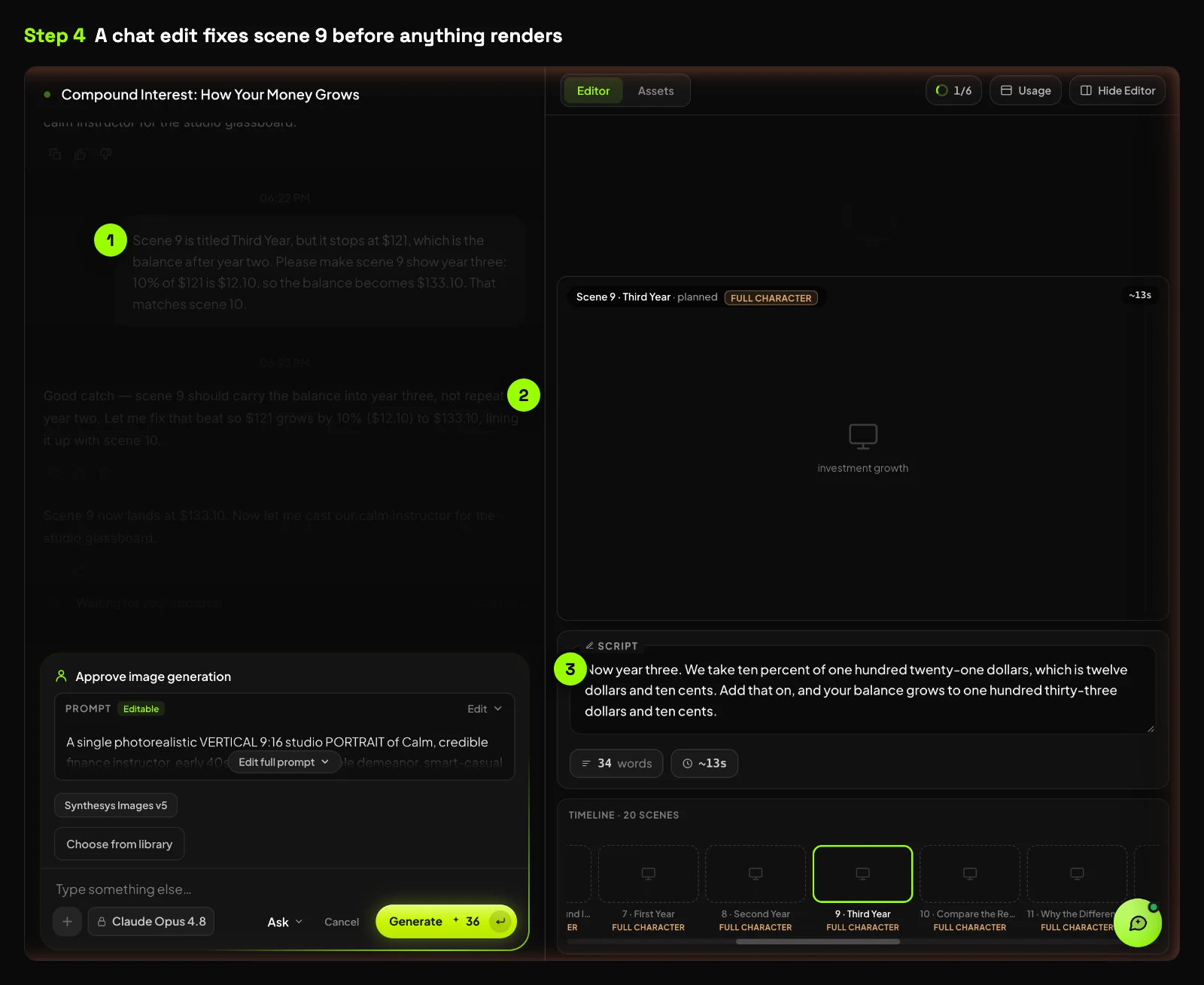
Fix it by chat before you render. Ask in plain words: "Scene 4, change the rate to 5%" or "Shorten scene 7 to one sentence". Script changes by chat cost nothing. In our test, redrawing a storyboard frame was a small paid edit, so fix the words first.
-
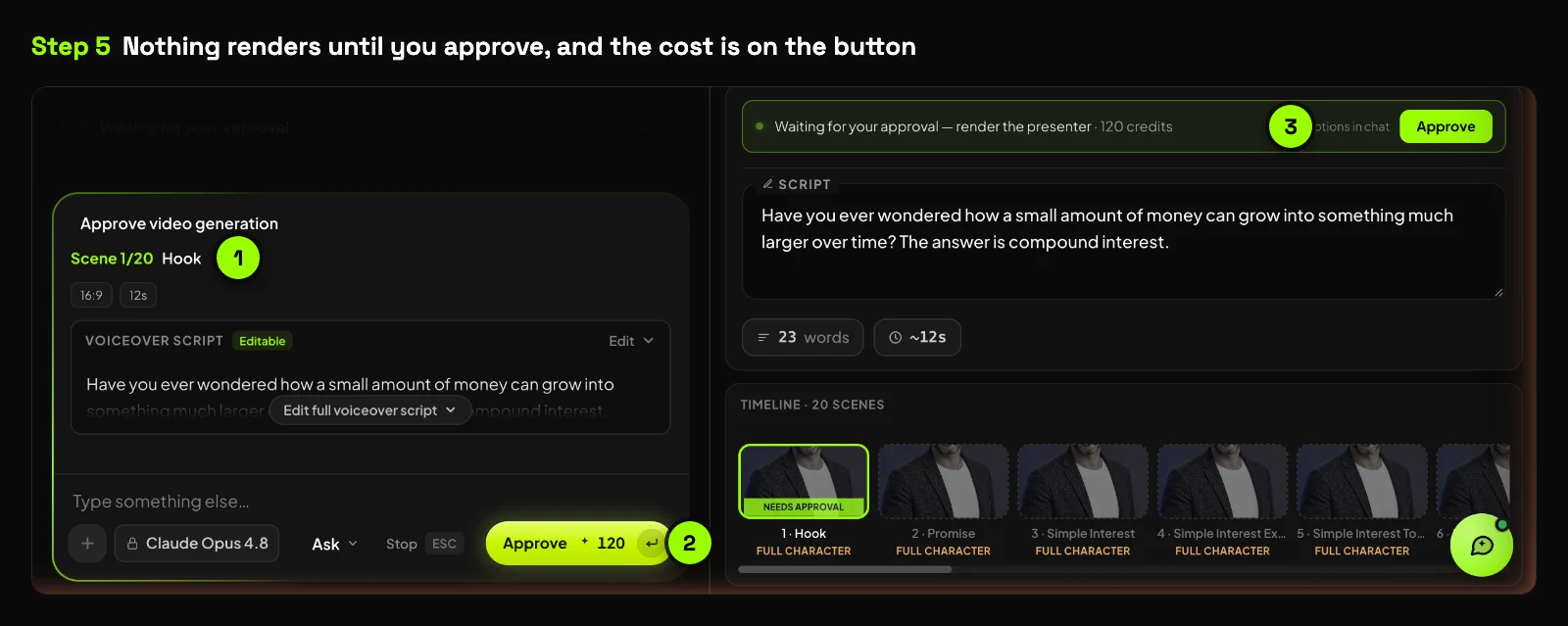
Approve with the cost on the button. Nothing renders until you approve, and the credit cost shows before you spend. In our test, each scene had its own approve button with its own price. Rendering runs in the background. More on this in why AI video credits get wasted.
-
Edit, translate and export. Trim, reorder, re-voice or restyle the finished cut by chat. Say "make it German" and the voice, captions and on-screen details change together. Export 16:9 for a course platform, or 9:16 and 1:1 for social.
What happened when we made one?
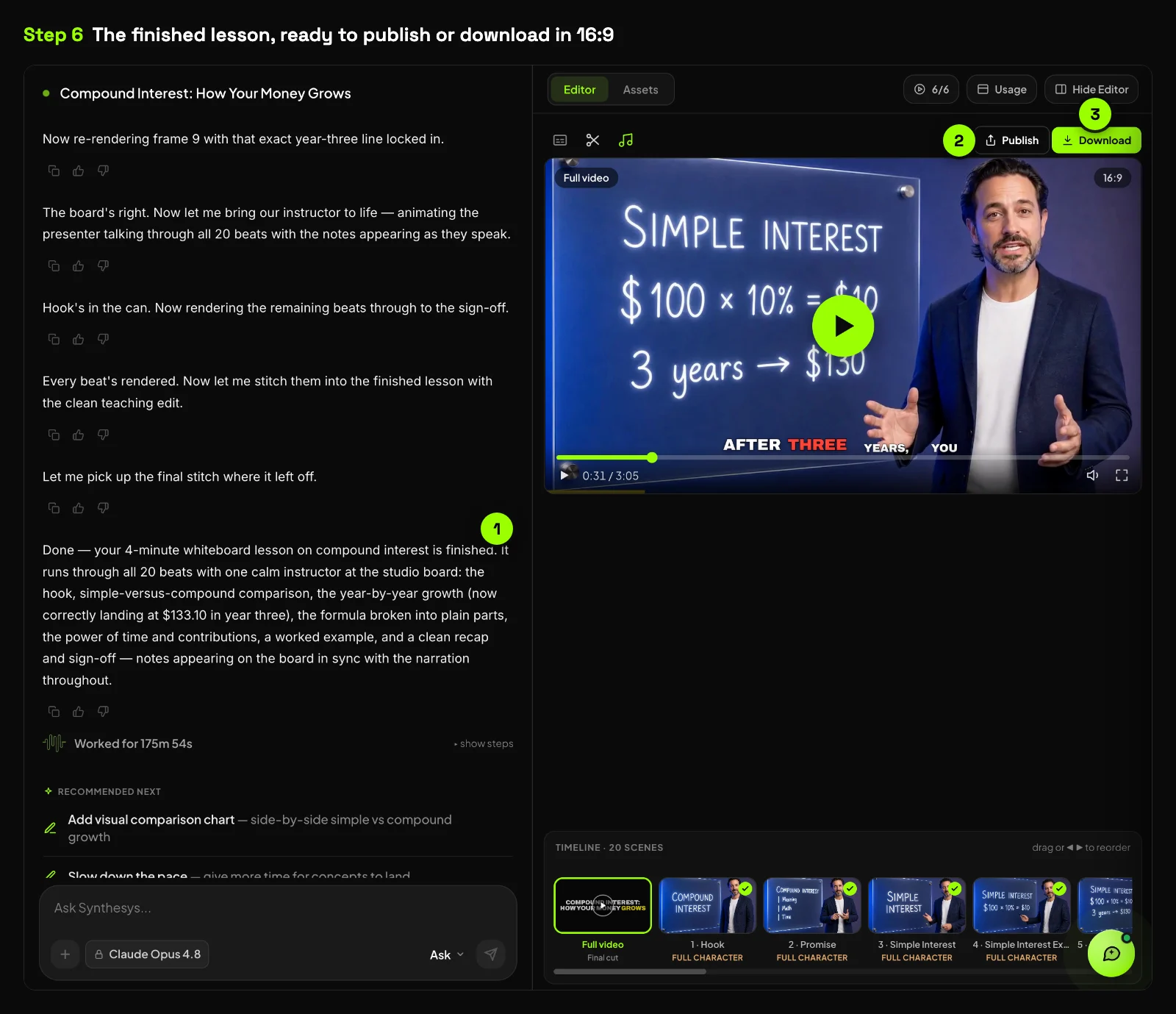
It worked, with two catches. From one sentence, Synthesys planned 20 scenes, cast a presenter and delivered a finished lesson with word-by-word captions. A script error was easy to fix by chat. A wrong number on one drawn board survived two redraws, and the video ran shorter than asked.
We gave Synthesys the same compound interest topic we used in our long-video test, where it became a faceless video. This time we asked for a 4-minute whiteboard lesson in 16:9. The agent planned 20 scenes in under a minute and cast a presenter who writes on a glass board.
Reading the scripts caught one real error. Scene 9 was titled "Third Year" but stopped at $121, the balance after year two. One chat message fixed the script, and script edits cost nothing. The drawn board for that scene still said "Year 3: $121" after two paid redraws, and it stayed that way in the final video.
Every scene had its own approve button with its price on it. The finished lesson ran 3 minutes 5 seconds, not the 4 minutes we asked for. The agent still called it a 4-minute lesson, so check the length yourself.
| Our test | |
|---|---|
| Brief | "A 4-minute whiteboard lesson on how compound interest works, for complete beginners, with one calm narrator." Whiteboard Explainer, 16:9 |
| Scenes planned vs 4 minutes asked | 20 scenes planned for about 4 minutes. The finished video ran 3:05. |
| Brief to storyboard | Scene plan and scripts in under 1 minute. Drawn storyboard in about 13 minutes, including our presenter approval. |
| Approve to finished video | About 57 minutes, with each of the 20 scenes approved in turn |
| Chat edits | 3: one script fix that worked, and two redraws of one board label that didn't fix it |
| Cost shown before approval | Yes, on the presenter image and on every scene. Storyboard redraws were labelled as paid edits, with no price shown. |
How do you write a script that works as a whiteboard lesson?
Write for the drawing, not for the page. Give each scene one idea and one thing to draw. Keep on-screen labels to a few words, and read the script aloud before you brief the agent. If a sentence is hard to sketch, the scene will be hard to follow.
- One idea per scene. VideoScribe's guide gives the same advice for manual whiteboard work (VideoScribe).
- Use concrete nouns. "A jar filling with coins" draws well. "Financial resilience" doesn't.
- Keep labels short. Long on-screen text is where spelling and number errors hide.
- Speak with energy. The edX study found faster, enthusiastic delivery more engaging (Guo, Kim and Rubin, 2014).
- Read it aloud and time it. Then set the length in your brief to match.
For narration craft, see our guide on how to write a voice-over script.
The most common mistake is cramming. People paste a whole blog post as the script and hope the drawings make it clear. Every scene ends up with three ideas and a paragraph of text. Six years of building AI voice and video taught me one thing: the script decides the result.
When is a whiteboard video the wrong format?
Use something else when the viewer needs to see the real thing. A software walkthrough needs the actual screen. A product ad needs the actual product. A brand film meant to make people feel something usually needs faces and real footage, not line art.
Whiteboard is for ideas, not objects. If you catch yourself describing what a button looks like, record the screen instead. You can mix both in one lesson: draw the concept, then show the product.
What are the limits of AI whiteboard videos?
AI whiteboard videos still need a human check. Drawn labels, numbers and captions can come back wrong, long lessons take longer to render, and the research on whiteboard learning is limited. Read every scene, and every number, before you approve it.
- Errors in text and numbers. In our long-video test, the voice was right. Some captions and footage needed fixes before publishing (long AI videos test). In our whiteboard test, one drawn label stayed wrong after two redraws.
- Render time grows with length. Longer videos take longer to render, though it runs in the background (Synthesys).
- The evidence has limits. The whiteboard study used online participants and social science lessons. The edX study measured hand-drawn tablet tutorials, not AI animation.
- Rights. You must hold the rights to any face or voice you upload (Synthesys).
- Length can drift. We asked for 4 minutes and got 3 minutes 5 seconds. The agent still called it a 4-minute lesson, so check the running time before you publish.
Try it
Synthesys plans the whole whiteboard lesson from one sentence: script, scenes, voice, captions and music. You read the storyboard and the cost before anything renders, and every plan includes full commercial rights. Start your first whiteboard video.
Read more: What is an AI video agent? · The Synthesys AI video agent · How to make long AI videos
Sources
- Guo, P. J., Kim, J. and Rubin, R. (2014). How Video Production Affects Student Engagement: An Empirical Study of MOOC Videos. L@S 2014. Opened 14 Oct 2026.
- Turkay, S. and Mouton, S. (2016). The educational impact of whiteboard animations: An experiment using popular social science lessons. Proceedings of the MIT LINC. Opened 14 Oct 2026.
- VideoScribe. How to create a whiteboard video. No date on page. Opened 14 Oct 2026.
- Synthesys. AI video agent product page. Opened 14 Oct 2026.
- Synthesys. How to Make Long AI Videos Without Stitching 8-Second Clips. 28 Sep 2026.
Frequently asked questions
What is an AI whiteboard video?
How long should a whiteboard explainer video be?
Do whiteboard animations help people learn?
Can I use my own face and voice in an AI whiteboard video?
Can I translate a whiteboard video into another language?
How much does an AI whiteboard video cost to make?
Keep reading
All posts →
How to Start a Faceless YouTube Channel With AI in 7 Steps
AI Video Credits: Why They Get Wasted and How to Stop It
How to Make Long AI Videos Without Stitching 8-Second Clips