Synthesys Studio: 35 AI Models for Image, Video and Voice
Synthesys Studio is an all-in-one AI image, video and voice tool: 35 models, the credit price before you press Generate, and no charge for failed runs.
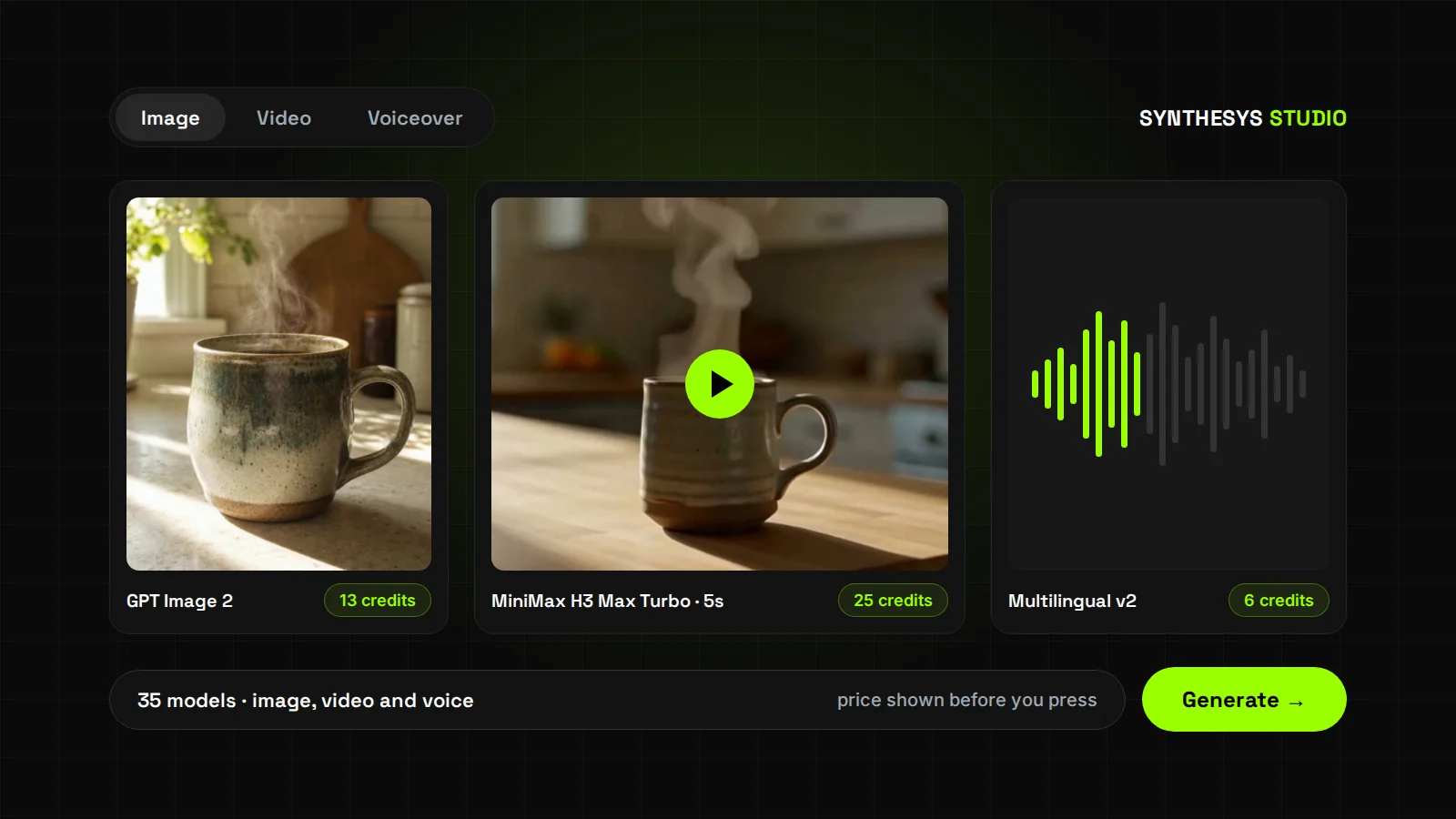
The Synthesys Video Agent builds a whole video from one sentence. Synthesys Studio does the opposite: you pick the exact AI model, set every option yourself, and get one image, clip or voiceover back.
We launched Synthesys in 2020 as an AI voice generator. Since then, every good new model has shown up with its own site, its own credits and its own surprises on the bill. We built Studio so you can use them in one place and see the price before you press anything.
What is Synthesys Studio?
Synthesys Studio is where you make single pieces in the Synthesys app, with the model you choose: one image, one clip or one voiceover. It sits next to the Video Agent and shares its Files. You see the price before anything runs.
Synthesys is an AI video agent that replaces traditional video production end to end. The agent writes, plans and renders a whole video for you. Studio hands you the models directly instead.
You open it from the sidebar, where it's marked NEW. Three tabs sit at the top: Image, Video and Voiceover. All three share one layout, so once you know one tab you know the other two.
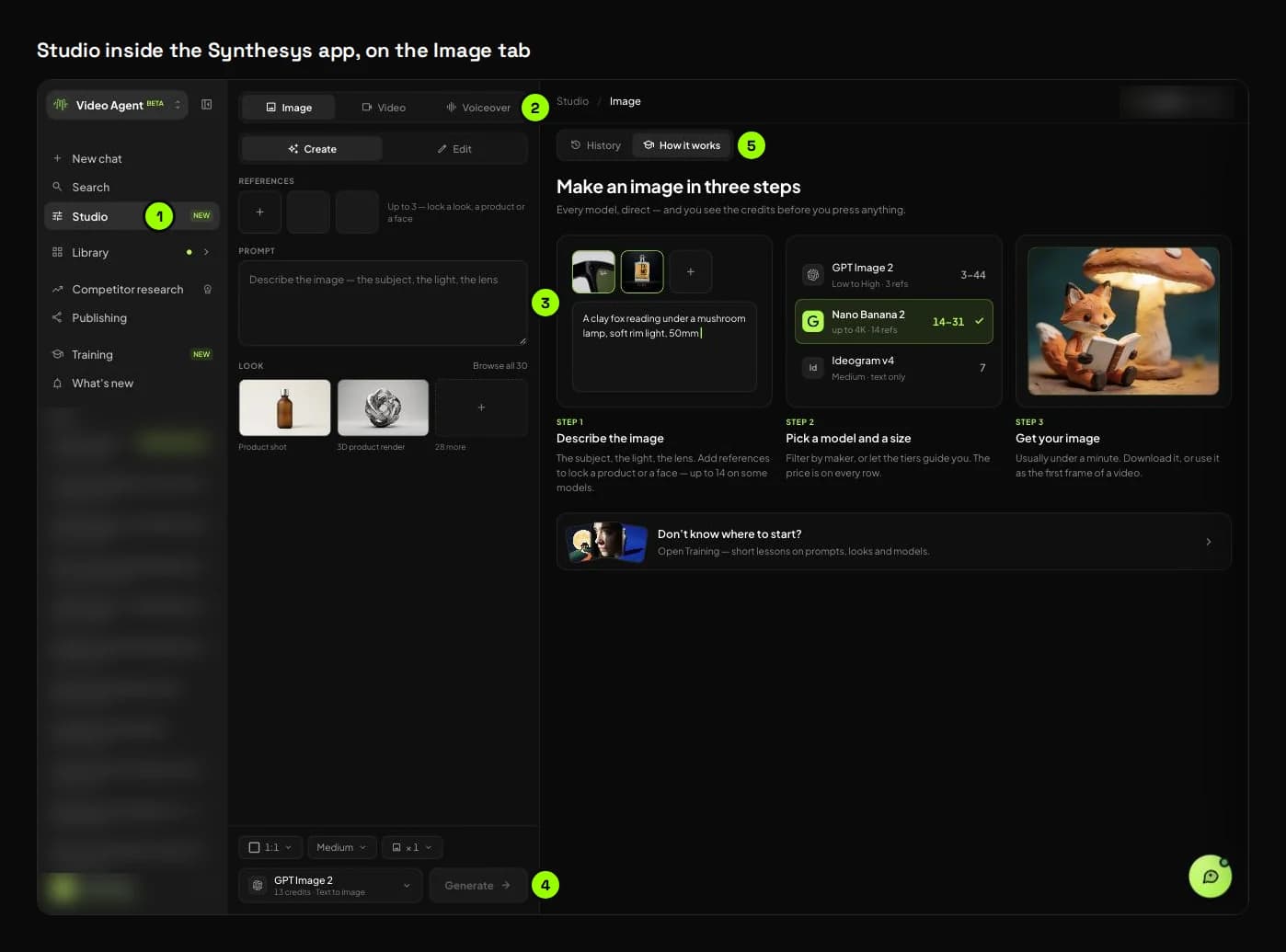
- Studio in the sidebar.
- The tool tabs: Image, Video and Voiceover. Each keeps its own prompt.
- Inputs and prompt: references, frames or a voice, then the prompt, shot or script. Studio only shows the slots the chosen model can use.
- The bottom bar: size and length settings, the model chip with its live price, and Generate. ⌘/Ctrl + Enter also generates.
- The right pane: History, where every result lands, and How it works, a three-step guide for each tool.
Here is the one-minute tour from Studio's own training lessons:
When should you use Studio, and when the Video Agent?
| Studio | Video Agent | |
|---|---|---|
| What you give it | A prompt, a shot or a script, plus the model and settings | A brief, as short as one sentence |
| What you get back | One image, one clip or one voiceover | A finished video with script, scenes, voice and music |
| Who picks the model | You, from 35 | The agent, by default |
| When you see the cost | On the model chip, before you press Generate | On the approve button, before anything renders |
| Best for | A product still, a single shot, a voice line, testing a model | Ads, explainers, UGC and long videos |
Our advice: if you're starting from a blank page, skip Studio. Tell the agent what the video is for and let it do the planning. Come to Studio when you already know the piece you need, or when you want to try a model before it goes into something bigger.
How do credits work in Studio?
Studio shows the price on the model chip, on every row of the model list and on every quality or resolution option. Pressing Generate takes nothing yet. Credits come off only when the result lands in History, and a failed run costs nothing.
The rules are the same on all three tabs:
- Priced before you press. Change the quality, the resolution, the length or the number of images, and the chip updates.
- Not charged yet. While a result renders, the card says how many credits will come off when it lands.
- Failures are free. A run that fails, runs too long or is refused by a model's safety filter shows "No credits charged". In a batch of images, only the ones that arrive are charged.
- Short on credits? Nothing starts. Studio shows how many credits you're short and which models fit your balance.
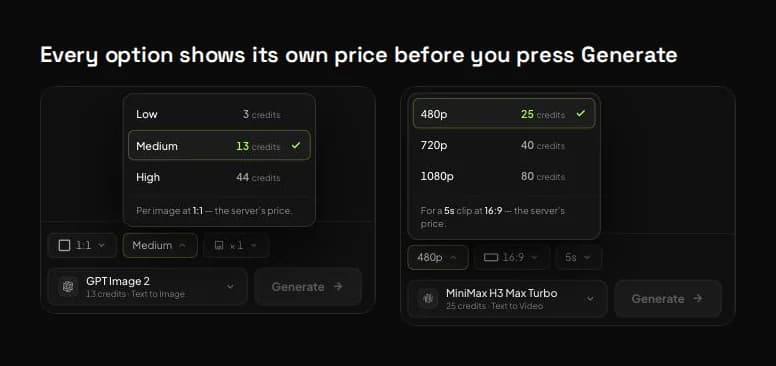
On GPT Image 2, Low, Medium and High cost 3, 13 and 44 credits per square image. On MiniMax H3 Max Turbo, a 5-second clip costs 25 credits at 480p, 40 at 720p and 80 at 1080p. On a few image models the shape changes the price too: GPT Image 2 at Medium costs 11 credits in 16:9 instead of 13.
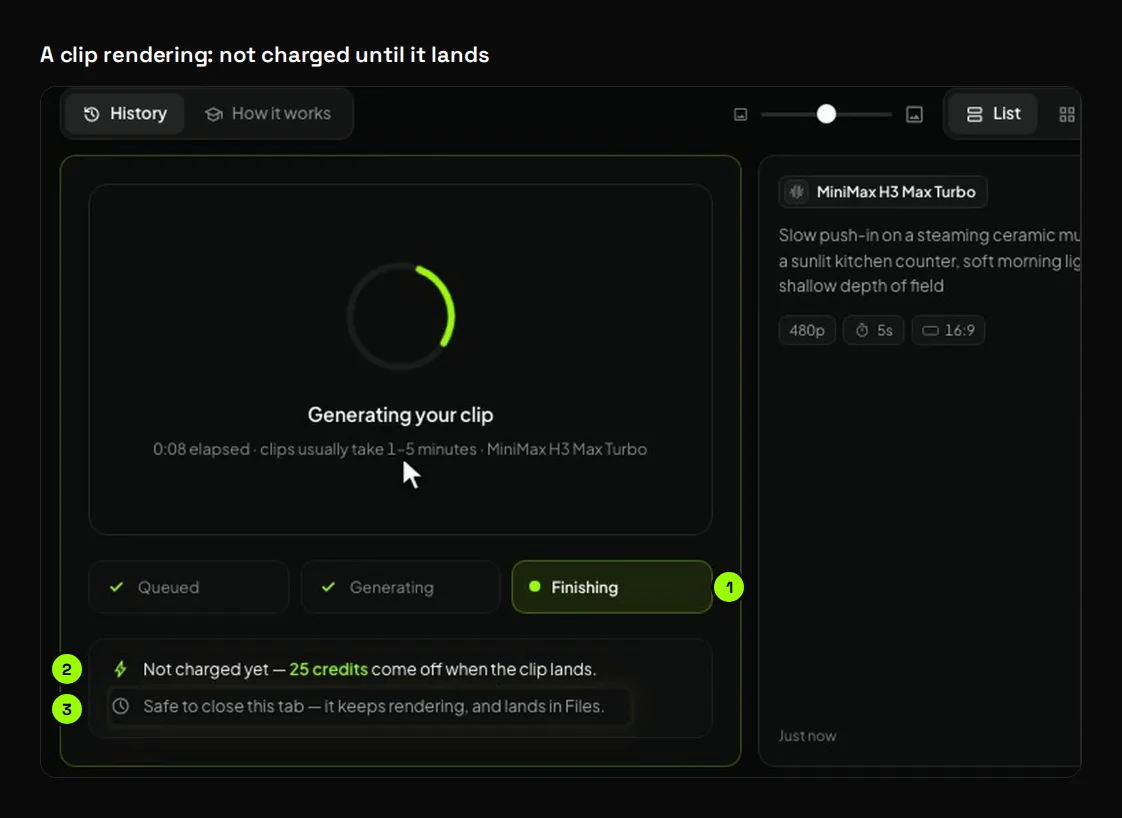
- The clip moves through Queued, Generating and Finishing.
- "Not charged yet: 25 credits come off when the clip lands."
- You can close the tab. The clip keeps rendering and lands in History and Files.
This is the same promise we make in the Video Agent, where a render waits for your approval with its cost on the button. We wrote about why that matters in AI Video Credits: Why They Get Wasted and How to Stop It.
What did the runs in our training lessons cost?
We recorded Studio's training lessons in the app on 27 September 2026: single runs, not a benchmark. Every time the app showed both numbers, the credits charged matched the chip. Eight runs, from a 6-credit voiceover to a 40-credit clip, came to 146 credits.
| What we made | Model and settings | Chip price | Charged | Time to land |
|---|---|---|---|---|
| A ceramic mug on a kitchen counter | GPT Image 2, Medium, 1:1 | 13 | 13 | Under a minute |
| The mug on a table, from 2 references | GPT Image 2, Medium, 1:1 | 13 | 13 | About 40 seconds |
| Edit: "make the mug matte black" | GPT Image 2, Edit, Medium | 13 | 13 | Not recorded |
| A 5-second push-in on the mug | MiniMax H3 Max Turbo, 480p, 16:9 | 25 | 25 | About 9 seconds |
| A 5-second clip from start and end frames | MiniMax H3 Max Turbo, 480p | 25 | 25 | About 10 seconds |
| A 4-second macro shot with a reference, a Look and audio | Seedance 2.0 Mini, 480p | 40 | 40 | About 2 minutes |
| A 129-character voiceover | ElevenLabs Multilingual v2, voice Roger | 6 | 6 | A few seconds |
| Three designed voice samples | Design a voice | 11 | Not shown | About 8 seconds |
Studio says clips usually take 1 to 5 minutes, so our two MiniMax clips were quick. The result screenshots in this article are frames from those lessons.
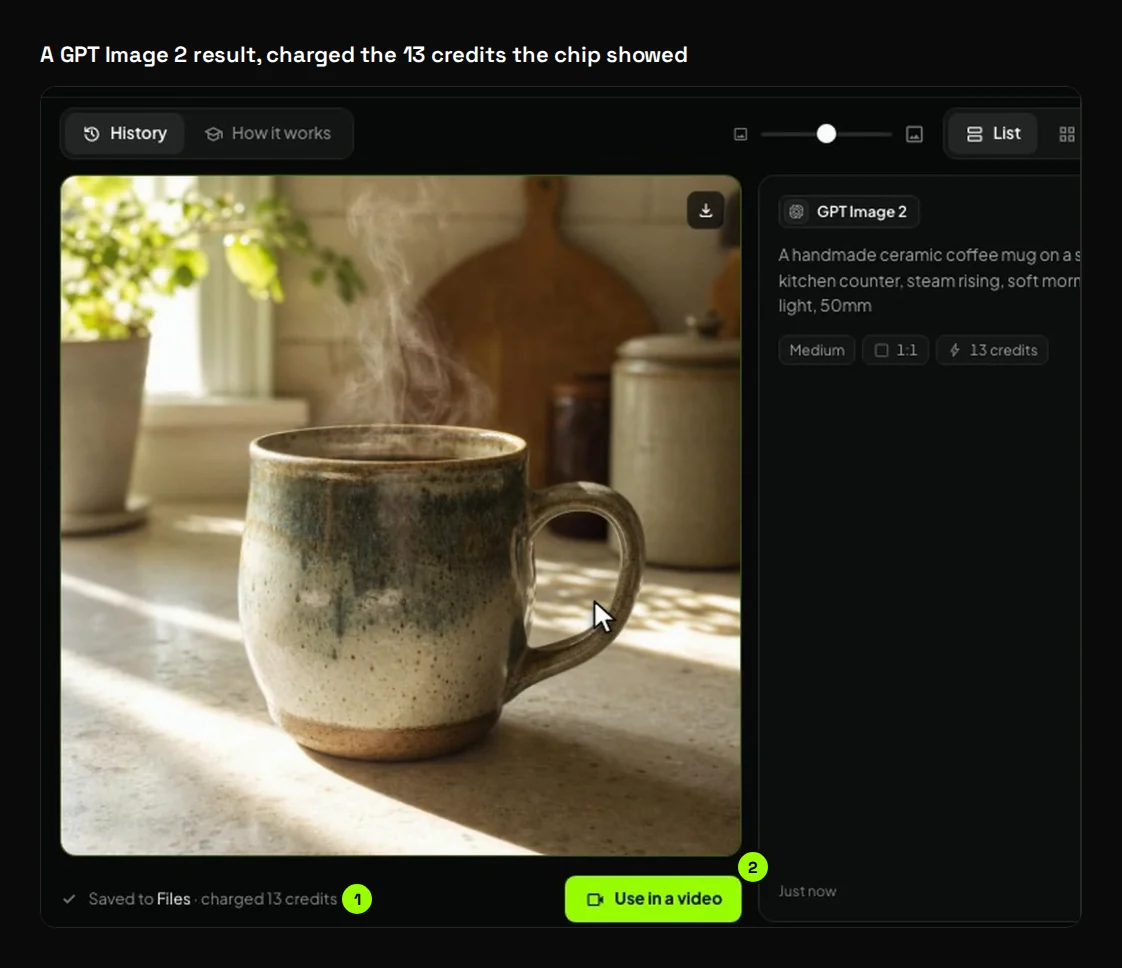
- "Saved to Files · charged 13 credits", the same price the chip showed.
- Use in a video sends the image straight into a Video Agent chat.
Which image model should you use?
Start with GPT Image 2 at Medium (13 credits), Studio's default. Draft on FLUX.1 [schnell] from 1 credit when you're still finding the idea. Use Ideogram v4 for words inside an image, and Nano Banana 2 or Pro when you need up to 14 reference images.
Studio's Image tab is an AI image generator with 18 models from 12 makers, grouped into three tiers. Each row in the model list shows the top size or quality, how many reference images the model takes, and its price.
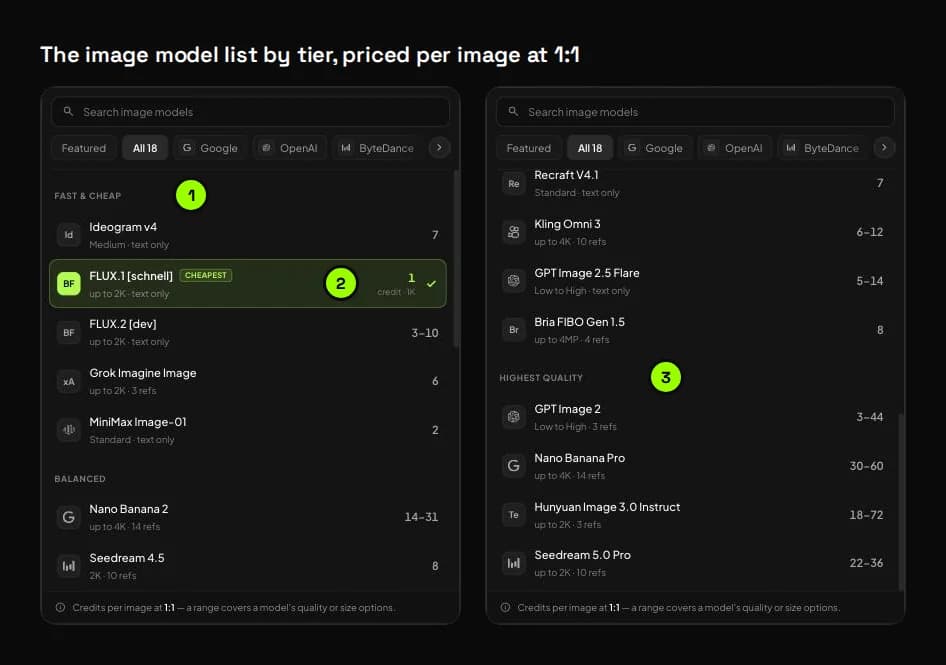
- Models are grouped by tier: Fast & cheap, Balanced and Highest quality.
- The cheapest model wears a CHEAPEST badge: FLUX.1 [schnell] at 1 credit for a 1K square.
- A range, like 3–44, covers a model's quality or size options. On Seedream 5.0 Pro and Grok Imagine Image, it also covers the number of references.
| Model | Maker | Tier | Credits per image (1:1) | Max references | Edit mode |
|---|---|---|---|---|---|
| FLUX.1 [schnell] | Black Forest Labs | Fast & cheap | 1–3 | Text only | No |
| MiniMax Image-01 | MiniMax | Fast & cheap | 2 | Text only | No |
| FLUX.2 [dev] | Black Forest Labs | Fast & cheap | 3–10 | Text only | No |
| Grok Imagine Image | xAI | Fast & cheap | 6 | 3 | Yes |
| Ideogram v4 | Ideogram | Fast & cheap | 7 | Text only | No |
| GPT Image 2.5 Flare | OpenAI | Balanced | 5–14 | Text only | No |
| Kling Omni 3 | Kuaishou | Balanced | 6–12 | 10 | Yes |
| FLUX.2 [pro] | Black Forest Labs | Balanced | 6–15 | Text only | No |
| Recraft V4.1 | Recraft AI | Balanced | 7 | Text only | No |
| Seedream 4.5 | ByteDance | Balanced | 8 | 10 | Yes |
| FLUX.1 Kontext [pro] | Black Forest Labs | Balanced | 8 | 1 | Yes |
| Bria FIBO Gen 1.5 | Bria AI | Balanced | 8 | 4 | Yes |
| Nano Banana 2 | Balanced | 14–31 | 14 | Yes | |
| Qwen Image 3 | Alibaba | Balanced | 15 | 3 | Yes |
| GPT Image 2 (default) | OpenAI | Highest quality | 3–44 | 3 | Yes |
| Hunyuan Image 3.0 Instruct | Tencent | Highest quality | 18–72 | 3 | Yes |
| Seedream 5.0 Pro | ByteDance | Highest quality | 22–36 | 10 | Yes |
| Nano Banana Pro | Highest quality | 30–60 | 14 | Yes |
Prices checked in the app on 30 September 2026. The exact price for your settings is always on the model chip.
The rest of the Image tab gives you five controls:
- Looks. 30 ready-made styles in four families: Photography, 3D & render, Illustration and Graphic. With an empty prompt, a Look writes the whole prompt for you to edit. With your own words, its direction is added when you generate, at no extra cost.
- References. Add your product, a face or a style from your uploads, your past images or stock photos. Depending on the model, that's 1, 3, 4, 10 or up to 14 images. On most models, references don't change the price.
- @ mentions. With two or more references, type @ in the prompt and pick one. It drops into your sentence as a chip, so the model knows which picture is which.
- Edit mode. Switch Create to Edit to change one thing in a picture and keep the rest. 11 models can edit, and you can bring in up to 2 extra images, like a logo or a colour.
- Shape, quality and count. Eight aspect ratios, from 16:9 to 9:21. One to four images per press, where four cost four times one.
Which is the best AI video model to pick in 2026?
For a first try, use MiniMax H3 Max Turbo: a 5-second 480p clip costs 25 credits, and it can start from your own still. Use Seedance 2.5 for clips up to 30 seconds. Use Veo 3 Fast when you want a 1080p shot from words alone.
Studio has 10 video models from Google, ByteDance, MiniMax, Black Forest Labs and xAI. Nine do text to video, and eight do image to video from a start frame. If you are weighing Seedance vs Veo vs MiniMax, all three are in one list, with a price on every row.
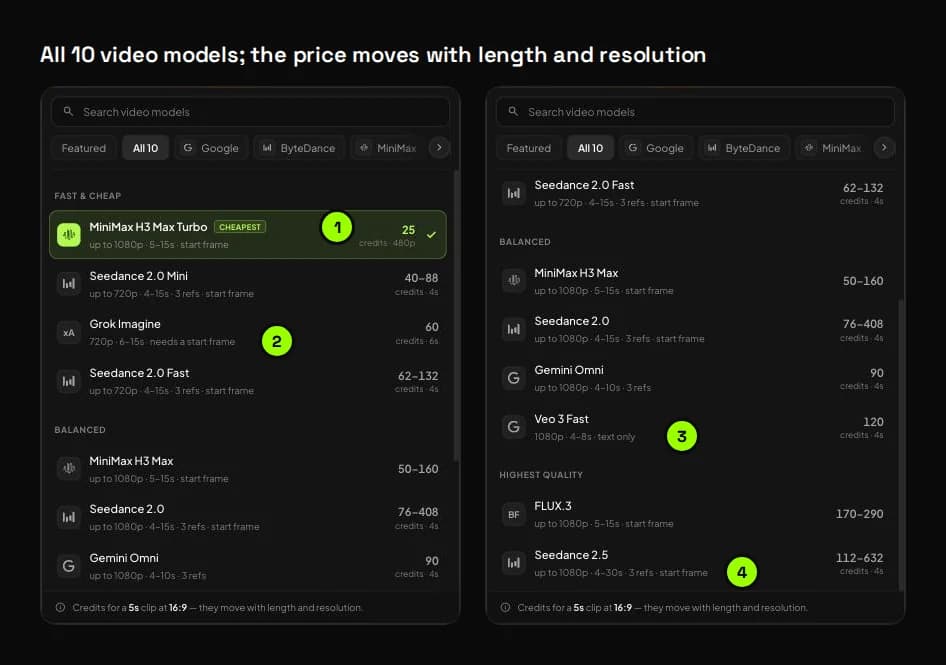
- MiniMax H3 Max Turbo is the cheapest and the default: 25 credits for 5 seconds at 480p.
- Grok Imagine needs a start frame. It only animates an image you give it.
- Veo 3 Fast works from words alone, at 1080p, for 4 to 8 seconds.
- Seedance 2.5 is the only model that goes past 15 seconds, up to 30.
| Model | Maker | Resolution | Length | Frames | Cheapest clip (credits) | Longest clip (credits) |
|---|---|---|---|---|---|---|
| MiniMax H3 Max Turbo (default) | MiniMax | 480p–1080p | 5–15 s | Start and end | 25 · 5 s 480p | 240 · 15 s 1080p |
| Seedance 2.0 Mini | ByteDance | 480p–720p | 4–15 s | Start and end | 40 · 4 s 480p | 330 · 15 s 720p |
| MiniMax H3 Max | MiniMax | 480p–1080p | 5–15 s | Start and end | 50 · 5 s 480p | 480 · 15 s 1080p |
| Grok Imagine | xAI | 720p | 6–15 s | Start frame required | 60 · 6 s | 150 · 15 s |
| Seedance 2.0 Fast | ByteDance | 480p–720p | 4–15 s | Start and end | 62 · 4 s 480p | 495 · 15 s 720p |
| Seedance 2.0 | ByteDance | 480p–1080p | 4–15 s | Start and end | 76 · 4 s 480p | 1,530 · 15 s 1080p |
| Gemini Omni | 720p–1080p | 4–10 s | None | 90 · 4 s | 180 · 10 s | |
| Seedance 2.5 | ByteDance | 480p–1080p | 4–30 s | Start and end | 112 · 4 s 480p | 1,890 · 30 s 720p |
| Veo 3 Fast | 1080p | 4–8 s | Text only | 120 · 4 s | 240 · 8 s | |
| FLUX.3 | Black Forest Labs | 720p–1080p | 5–15 s | Start only | 170 · 5 s 720p | 870 · 15 s 1080p |
Cheapest-clip prices were read in the app on 30 September 2026, at 16:9. Longest-clip prices come from Studio's training guide, dated September 2026.
Five video settings to know:
- Start and end frames. The clip opens on your start frame and, on MiniMax and Seedance, ends on your end frame. On MiniMax, frames didn't change the price, and the clip follows the frame's shape.
- Audio. Seedance and FLUX.3 have an audio switch; Veo, Gemini Omni and Grok always make sound; MiniMax has none. Turning audio on or off never changes the price.
- References and reference audio. Seedance and Gemini Omni take up to 3 reference images. Seedance can also follow a sound or one of your voiceovers.
- Looks. 55 video Looks in three families: Commercials, UGC, and Graphics & painted.
- Auto-switching. Switch to a model that can't do your setting, and Studio picks the nearest one and tells you what changed.
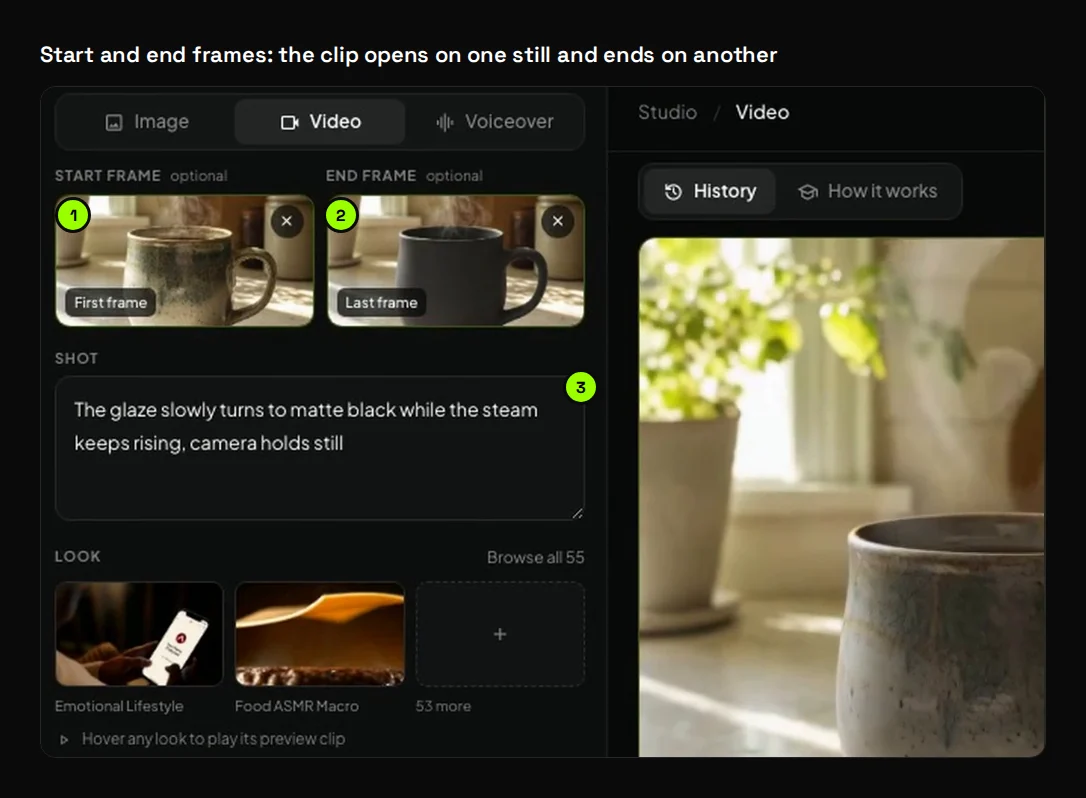
- The start frame: the glazed mug from an earlier image.
- The end frame: its matte-black edit.
- The shot describes what happens in between. This MiniMax run cost 25 credits, the same as the clip without frames.
How do you make an AI voiceover and clone your voice?
Paste a script on the Voiceover tab, pick a voice, and check the price under the box: credits per 1,000 characters, rounded up. Seven voice models run from 2 to 40 credits per 1,000 characters. Cloning your own voice is free and takes 10 to 20 seconds of speech.
The voice is who speaks; the text-to-speech model is the engine that speaks it. Every voice has a free preview, so you can hear it before you choose.
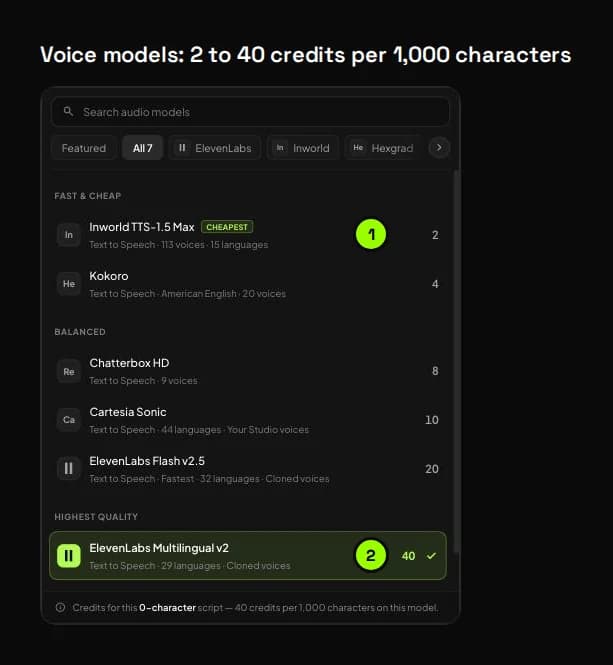
- Inworld TTS-1.5 Max is the cheapest: 2 credits per 1,000 characters.
- ElevenLabs Multilingual v2 is the default: 40 credits per 1,000 characters.
| Model | Maker | Credits per 1,000 characters | Voices and languages | Max per run |
|---|---|---|---|---|
| Inworld TTS-1.5 Max | Inworld | 2 | 113 voices, 15 languages | 2,000 characters |
| Kokoro | Hexgrad | 4 | 20 voices, American English | 2,000 characters |
| Chatterbox HD | Resemble AI | 8 | 9 voices; takes 2–4 minutes | 2,000 characters |
| Cartesia Sonic | Cartesia | 10 | 44 languages, plus voices you make in Studio | 5,000 characters |
| ElevenLabs Flash v2.5 | ElevenLabs | 20 | 20 voices plus your clones; 32 languages; the fastest | 5,000 characters |
| ElevenLabs Multilingual v2 (default) | ElevenLabs | 40 | 20 voices plus your clones; 29 languages | 5,000 characters |
| ElevenLabs Eleven v3 | ElevenLabs | 40 | 20 voices plus your clones; 70+ languages; the expressive one | 5,000 characters |
Our 129-character line on Multilingual v2 came to 129 × 40 ÷ 1,000 = 5.16, rounded up to 6 credits. The same line on Inworld would be 1 credit, the minimum.
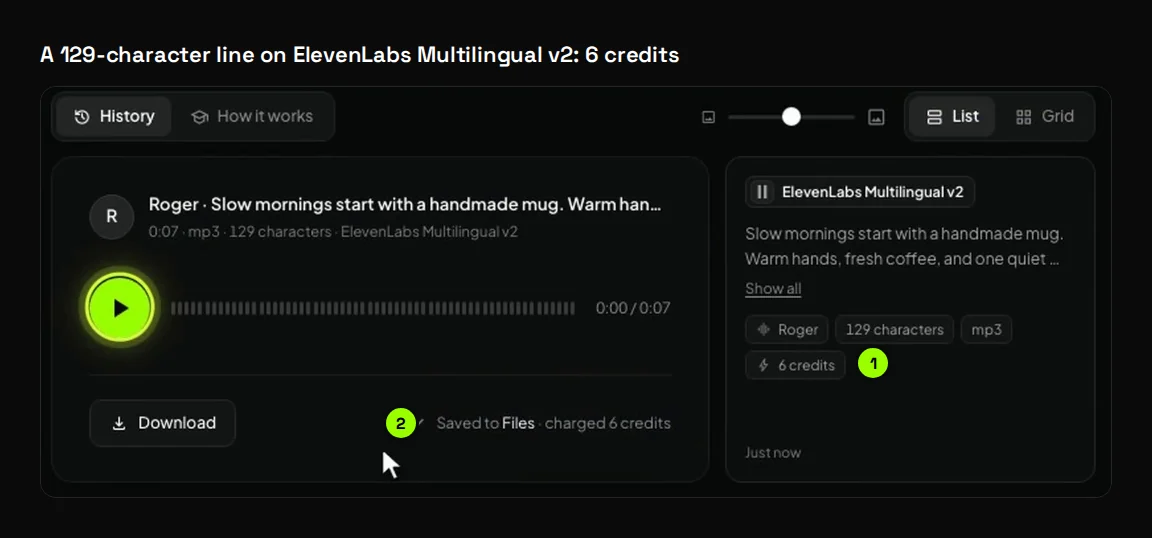
- The row keeps the voice, the character count and the price: 6 credits.
- "Saved to Files · charged 6 credits". Every voiceover is saved as an mp3.
You can also make voices of your own:
- Clone a voice, free. Voice cloning costs nothing. Record or upload 10 to 20 seconds of clear, lively speech from one person, as MP3, WAV, MP4 or WebM. Then name it, pick one of 15 languages, and confirm it's your voice or that you have the speaker's permission.
- Design a voice. Describe the age, accent and mood, or start from a preset like Conversational Narrator. Each press makes three samples for 11 credits. Saving the one you like is free.
- Keep up to three. Clones and designed voices share three slots. The bin beside a voice frees one.
Voices you make in Studio speak on Cartesia Sonic. Voices cloned in a Video Agent chat speak on the ElevenLabs models.
How do Studio pieces become a finished video?
Studio makes the pieces; the Video Agent puts them together. Make a still, use it as a clip's start frame, then press Use in a video on the clip. The agent opens with your clip attached, and nothing runs until you send the brief.
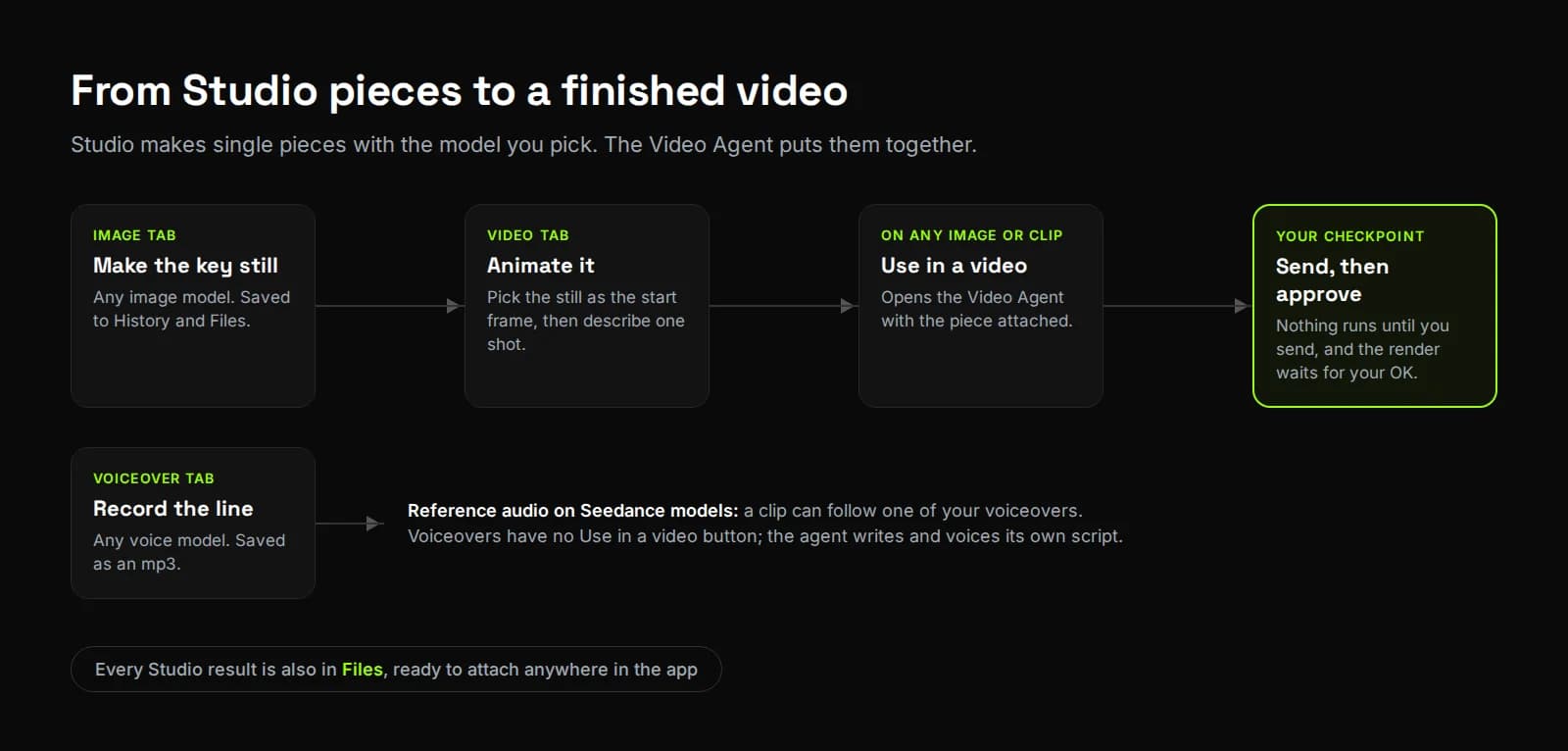
There are three hand-offs:
- Image to clip. Make the key still on the Image tab, then pick it as the start frame on the Video tab. Your Studio images wait under Image generations in the library.
- Voice to clip. On Seedance models, a clip can follow one of your voiceovers as reference audio.
- Images and clips to the Video Agent. Every image and clip has a Use in a video button. It opens the agent's composer with the piece attached and a starter line you rewrite into your brief.
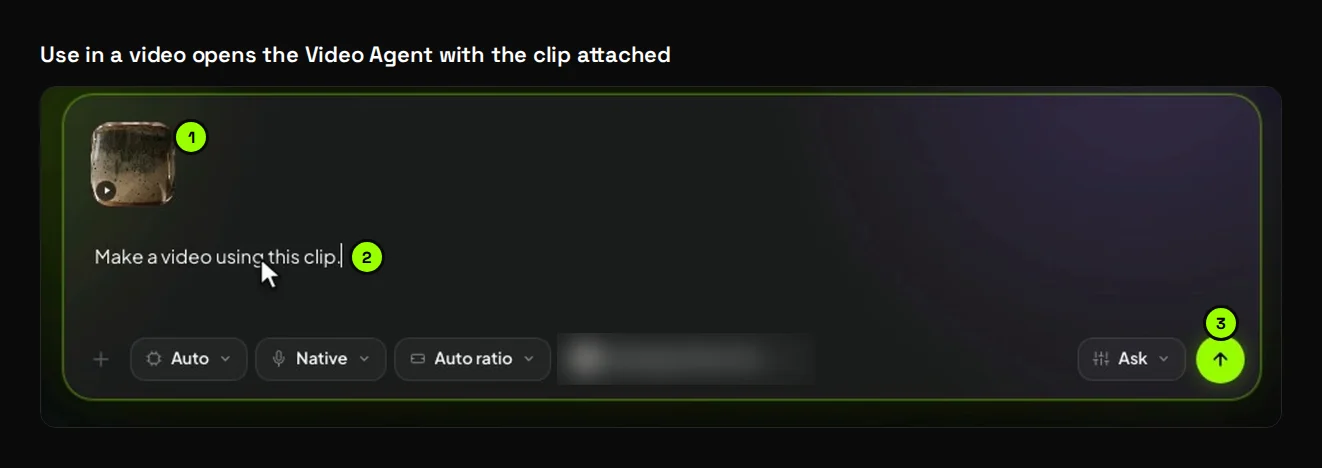
- The Studio clip, attached.
- A starter line, "Make a video using this clip.", for you to rewrite.
- Nothing runs until you press send.
Voiceovers don't have this button, because the agent writes and voices its own script. From there, the agent plans the video and shows the cost on its approve button. It works the same way for long AI videos.
How does Studio compare with other all-in-one AI image, video and voice tools?
Showing the price first isn't unique: Higgsfield and Yapper do it too, and Runway and Higgsfield return credits after most failures. Studio prices each quality and resolution option, and never charges a failed run on any model. It also keeps voice models with free cloning in the same place.
Looking for a Higgsfield alternative, or comparing all-in-one tools? We only used each company's own pages, opened on 30 September 2026, and left out prices because they change too often.
| Platform | Models (their own claim) | Cost before you generate | Failed generations | Voice |
|---|---|---|---|---|
| Synthesys Studio | 18 image, 10 video, 7 voice | On the model chip and every quality or resolution option | Never charged; credits come off when a result lands | 7 voice models, free cloning, voice design |
| Higgsfield | "30+ models and tools" | "Shown on the Generate button" (help centre) | Credits usually returned automatically; some models excepted | Audio and lip-sync tools |
| Yapper | "24+ Pro Image Models", "36+ Pro Video Models" | "Always visible before you start" | Not stated on the pricing page | Lip-sync and audio generation |
| Magnific (formerly Freepik) | "30+ models" | Credits per generation listed on the pricing page | Not stated on the pricing page | Audio and music generation |
| Krea | All image models on every plan; all video models on Pro and up | Not stated on the pricing page | Not stated on the pricing page | Lip-sync models |
| Runway | Gen-4.5 plus partner models | Not stated on its credits page | "Automatically returned" after an error | Not checked |
Where the others are stronger:
- Higgsfield lists Soul ID "for consistency", plus audio and lip-sync tools for dubbing and localization.
- Krea has real-time models that draw as you type or sketch.
- Magnific comes with a stock library of over 250 million photos, videos, vectors and PSDs.
- Yapper lists more models than Studio: 24+ image and 36+ video, against our 18 and 10.
- Lip-sync and music. Studio has no lip-sync or music models of its own. Higgsfield, Yapper and Krea list lip-sync, and Magnific lists music. In Synthesys, the Video Agent adds voice, captions and music to finished videos.
We ran Higgsfield's lip sync, dubbing and Seedance tools ourselves in Higgsfield vs HeyGen.
If one model's special controls are your whole workflow, a specialist tool may suit you better, and that's fine. We built Studio for everyone else: image, video and voice in one place, priced up front, and a short step from a finished video.
How do you spend Studio credits wisely?
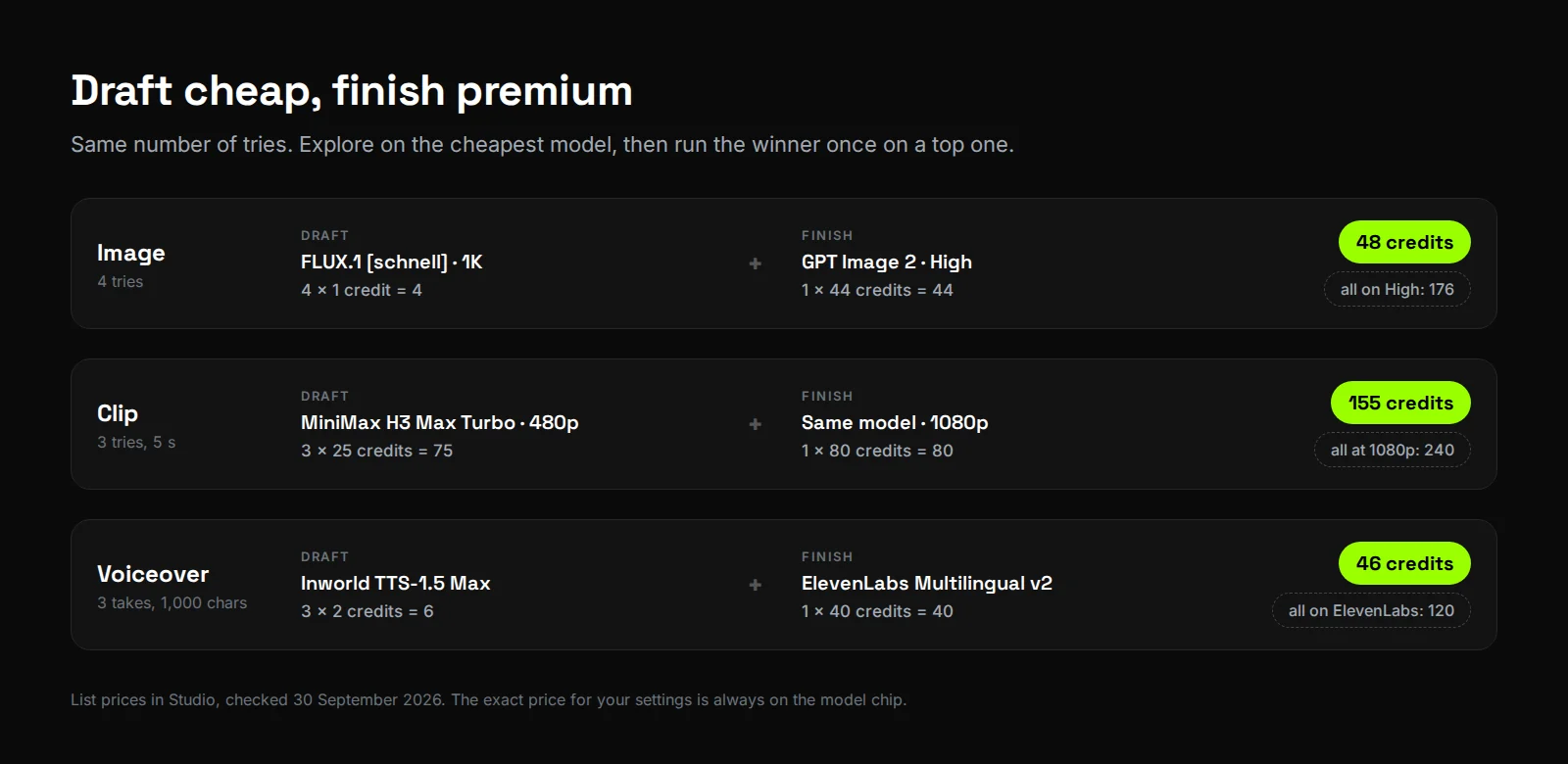
Draft on the cheapest model, then re-run the winner once on a top model with Reuse settings. Prove a clip at 5 seconds before paying for 15, and make four images only while exploring. Four drafts plus one final image cost 48 credits this way, against 176 for four tries on the top setting.
| Habit | Numbers from the Studio price list |
|---|---|
| Draft cheap, finish premium | Four FLUX.1 [schnell] drafts plus one GPT Image 2 High image cost 48 credits. Four tries on High cost 176. |
| Draft clips at 480p | Three 5-second MiniMax H3 Max Turbo drafts at 480p (75) plus one at 1080p (80) cost 155 credits. Three at 1080p cost 240. |
| Prove a clip short | MiniMax H3 Max Turbo at 480p costs 25 credits for 5 seconds and 75 for 15. |
| One still, many clips | A start frame costs a few credits once, and every clip you animate from it opens on the same picture. |
| ×4 only while exploring | Four GPT Image 2 Medium images cost 52 credits; one costs 13. |
| Watch the shape | GPT Image 2 at Medium costs 11 credits in 16:9 and 13 in 1:1. |
| Cheap voices for drafts | A 1,000-character script costs 2 credits on Inworld and 40 on ElevenLabs Multilingual v2. Three Inworld takes plus one final ElevenLabs take cost 46 credits; three ElevenLabs takes cost 120. |
For an image prompt, write subject, setting, light and lens, as in "A frosted amber bottle on wet slate, soft window light, 85mm." For a clip, write one shot and one move. For a voiceover, write for the ear, with short sentences and a comma wherever you want a breath.
What are the limits of Studio?
Studio makes single pieces, one generation at a time, and its model list and prices can change. Real names and brands are the most common reason a model refuses. Some models only take certain inputs, only Seedance 2.5 goes past 15 seconds, and there is no lip-sync, music or free trial.
- One generation at a time. It's a limit we hit ourselves. In the Video Agent we can open many videos at once. In Studio, we wait for one generation to end before starting the next, and we're working on it.
- Prices and models move. The prices above were read in the app on 30 September 2026, apart from the longest-clip column. The chip is the only price that counts.
- Real people and brands are often refused. Naming a real, identifiable person, a brand or a copyrighted character is the most common reason a model says no. Describe the person instead: "a man in his 40s, salt-and-pepper beard". A refused run costs nothing.
- Not every model takes every input. Veo 3 Fast is text only, 1080p and 16:9. Grok Imagine needs a start frame, and Gemini Omni takes no frames. On Seedance, reference audio can't be used with a frame, or an end frame with reference images.
- Long clips are Seedance 2.5 only. Every other model stops at 15 seconds or less, and Seedance clips over 15 seconds top out at 720p.
- Three voices of your own. Clones and designed voices share three slots, and Studio clones speak only on Cartesia Sonic.
- Voiceovers can't go straight to the agent. Only images and clips have Use in a video.
- No speed or emotion sliders. You pick the model and voice that fit the mood. Eleven v3 is the expressive one.
- No free trial. The cheapest way to try Studio is a 1-credit FLUX.1 [schnell] image or a short Inworld voiceover.
Try it
Studio is included on every Synthesys plan, next to the Video Agent, and every plan comes with full commercial rights. Open Studio from the sidebar, write a prompt, and check the price on the chip before you press Generate. Open Synthesys.
New to the agent side? Start with what an AI video agent is, then read our guide to AI video credits.
Sources
All opened on 30 September 2026.
- Synthesys Studio in the app (app.synthesys.io/studio): model lists and prices, checked while logged in.
- Synthesys Studio · Complete Training, customer edition (PDF, 43 pages, September 2026) and its 19 video lessons.
- Synthesys pricing: "Studio tools: images, clips and voiceover" on every plan.
- Synthesys llms.txt: full commercial rights on all plans; the Video Agent shows the credit cost before anything renders.
- Synthesys Video Agent
- Higgsfield Help: How do Higgsfield credits work (updated 3 August 2026)
- Higgsfield: Best All-in-One AI Video Subscriptions in 2026 (21 September 2026)
- Yapper pricing
- Magnific (formerly Freepik) pricing
- Krea pricing
- Runway Help: Why am I receiving errors when trying to generate?