What Is a VSL? How to Make a Video Sales Letter With AI
A VSL is a scripted video that walks one viewer from problem to offer. Learn the script structure, how long it should be and how to make a VSL with AI.
Maybe you've written a long sales page, watched visitors scroll past it, and wondered if a video would do better. That's the job a VSL was built for.
Synthesys has rendered over 1,000,000 videos since 2020, and sales videos are one of the formats its agent plans from a single brief. A lot of Synthesys users sell something from their own page: a course, an app, a service. For them a VSL was the hardest video to make, because it needed a writer, a presenter and an editor. Now the plan costs nothing to draft. The real work is the script you sign off.
What is a VSL?
A VSL, or video sales letter, is a scripted video that does the job of a written sales page. It talks to one viewer, follows a fixed persuasion order and ends with one action: buy, book a call or sign up. It usually sits on its own landing page.
The format comes from direct-response copywriting, where long sales letters did the selling on their own. HubSpot's guide describes a VSL as a video that grabs attention, discusses the prospect's pain points and presents the product as the solution. Vidico puts it more simply: the persuasion structure of a text sales letter, delivered with a voice and a face.
The single goal is what sets it apart. An ad's job is the click. A VSL's job is the sale, on the page the ad sends people to.
Here's how it compares with the formats it gets confused with. Lengths are the ranges shown on the template cards in the Synthesys app, checked on 2 October 2026.
| Format | Main job | Ends with | Typical length |
|---|---|---|---|
| Sales video / VSL | Sell one offer to one viewer | Buy, book or sign up | 1 to 10 min |
| Explainer video | Teach how something works | Learn more | 30 sec to 2 min |
| UGC ad | Earn the click in a feed | Tap through to a page | 15 to 30 sec |
| TV commercial | Build recall at scale | Brand or offer | 15 to 30 sec |
How long should a VSL be?
A VSL should run as long as the offer needs to be believed. Published advice ranges from about a minute to 45 minutes. The guides agree on one rule: the more you ask the viewer to pay or commit, the more proof and time the video needs.
Here's how far apart the advice is, from pages ranking for "VSL" on 2 October 2026:
- Sendspark suggests 60 to 120 seconds for cold outreach and 3 to 7 minutes on a landing page. High-ticket offers get 15 to 20 minutes.
- Versely suggests 6 to 9 minutes for cold traffic and 4 to 6 minutes for warm traffic.
- Rob Palmer suggests 5 to 15 minutes for low-cost offers and 20 to 45 minutes for higher-priced ones.
The ranges overlap but rarely agree, so treat them as starting points and test.
Script length is easier to pin down. Voices.com citing the National Center for Voice and Speech, puts conversational speech in the US at around 150 words a minute. At that pace:
| VSL length | Script length (about) |
|---|---|
| 1 minute | 150 words |
| 3 minutes | 450 words |
| 5 minutes | 750 words |
| 10 minutes | 1,500 words |
| 20 minutes | 3,000 words |
Slower reads stretch the same script. The Voices.com calculator defaults to 120 words a minute, which turns 750 words into about 6 minutes 15 seconds. Time a test read before you lock the script.
In Synthesys, the Sales Video template runs 1 to 10 minutes. Presentation videos run 1 to 30 minutes.
Our own test shows why the read matters. We asked for 3 minutes and got 18 scenes of 10 seconds, but only 313 words of script. That's about 105 words a minute, well under the 450 words the table suggests.
My rule: pick the length after you know how much real proof you have. If you can't fill the proof part with real results, the video is too long. Then read the script out loud once, with a timer, before you approve anything.
What goes into a VSL script?
Nearly every VSL follows the same order. It opens with a hook and the problem, then your solution and why it works, then proof, the offer and one call to action. Each part answers the question the viewer has at that moment. Skip a step and the viewer is left with an objection the video never answers.
That order appears, with small changes, in the guides from Vidico, Sendspark and Rob Palmer, who splits it into seven stages.
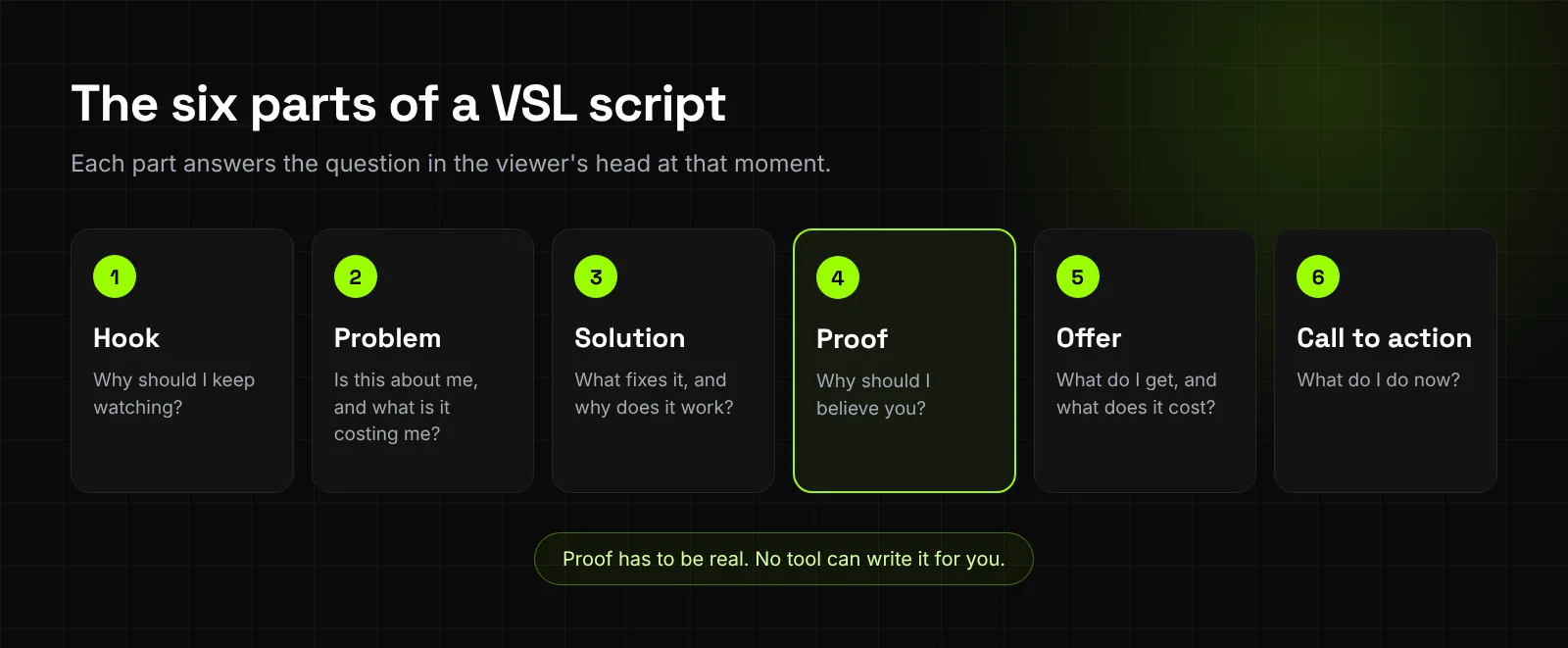
- Hook. The first seconds name the viewer's problem or make a claim they want explained. Rob Palmer's guide warns that if you lose the viewer in the first 15 seconds, nothing else matters.
- Problem. Describe the problem in the viewer's own words, and what it costs them to leave it unsolved.
- Solution and mechanism. Introduce the product and the reason it works, not just the feature list.
- Proof. Real results, real customers, demos or data. This is the part no tool can write for you.
- Offer. What they get, what it costs and any guarantee you actually honour.
- Call to action. One action, said plainly, with the button visible on the page.
The mistake I see most is a VSL with no proof in it. Our test brief gave the agent no results to work with. So its script went straight from the problem to the course and the call to action. That's the right behaviour, because an agent shouldn't invent proof. It also means the proof has to come from you, in the brief.
How do you make a VSL with AI, step by step?
Write a short brief that names the offer, the viewer, the length and the presenter, and attach your sales copy. Read the script and storyboard the agent returns and fix them on paper. Check the credit cost on the approve button, render, then edit the finished cut by chat.
Synthesys is an AI video agent that replaces traditional video production end to end. It has a Sales Video template, and the steps below follow its product page and our own test in the app. If agents are new to you, start with What is an AI video agent?
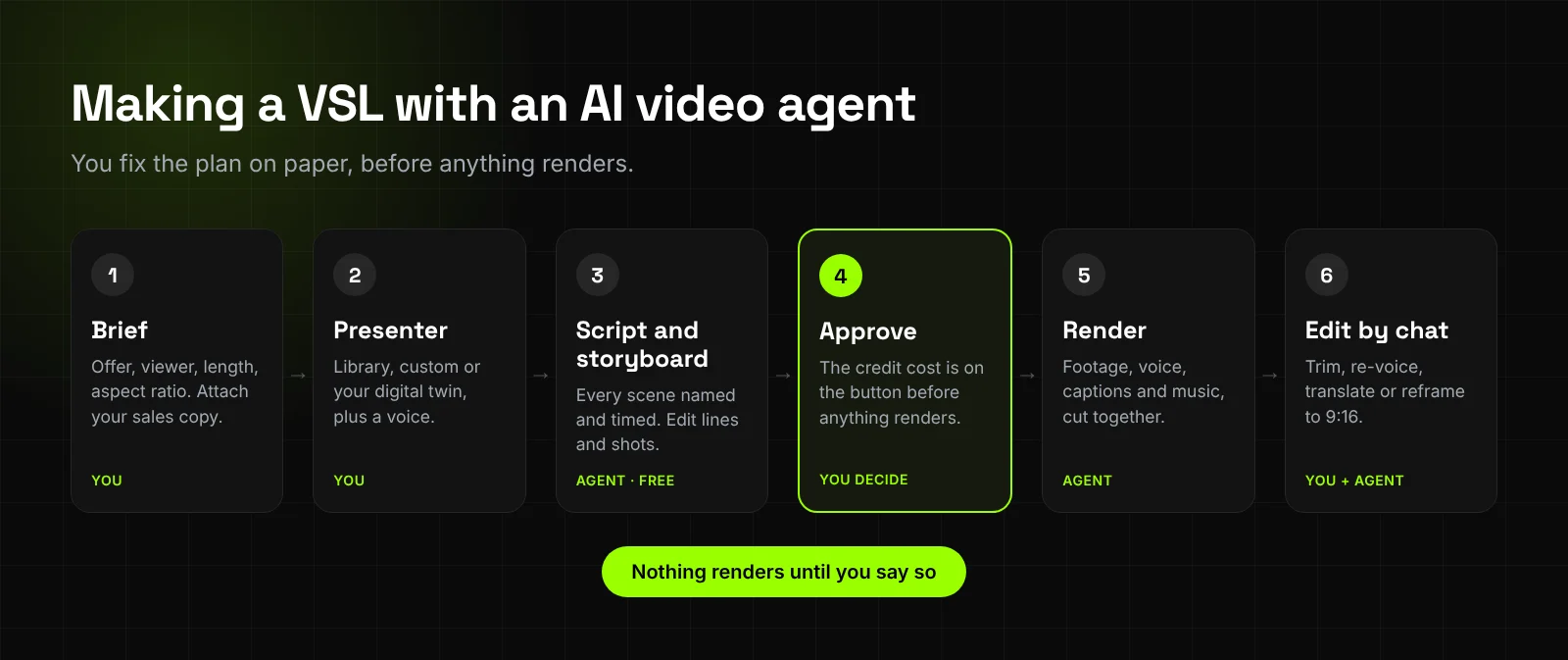
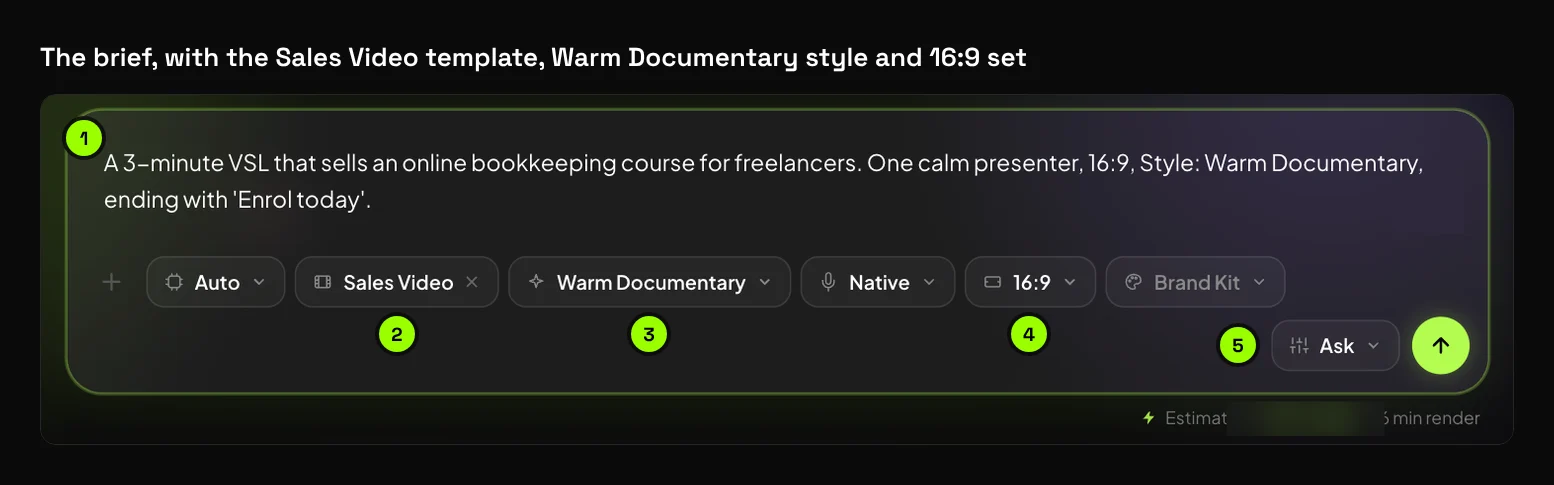
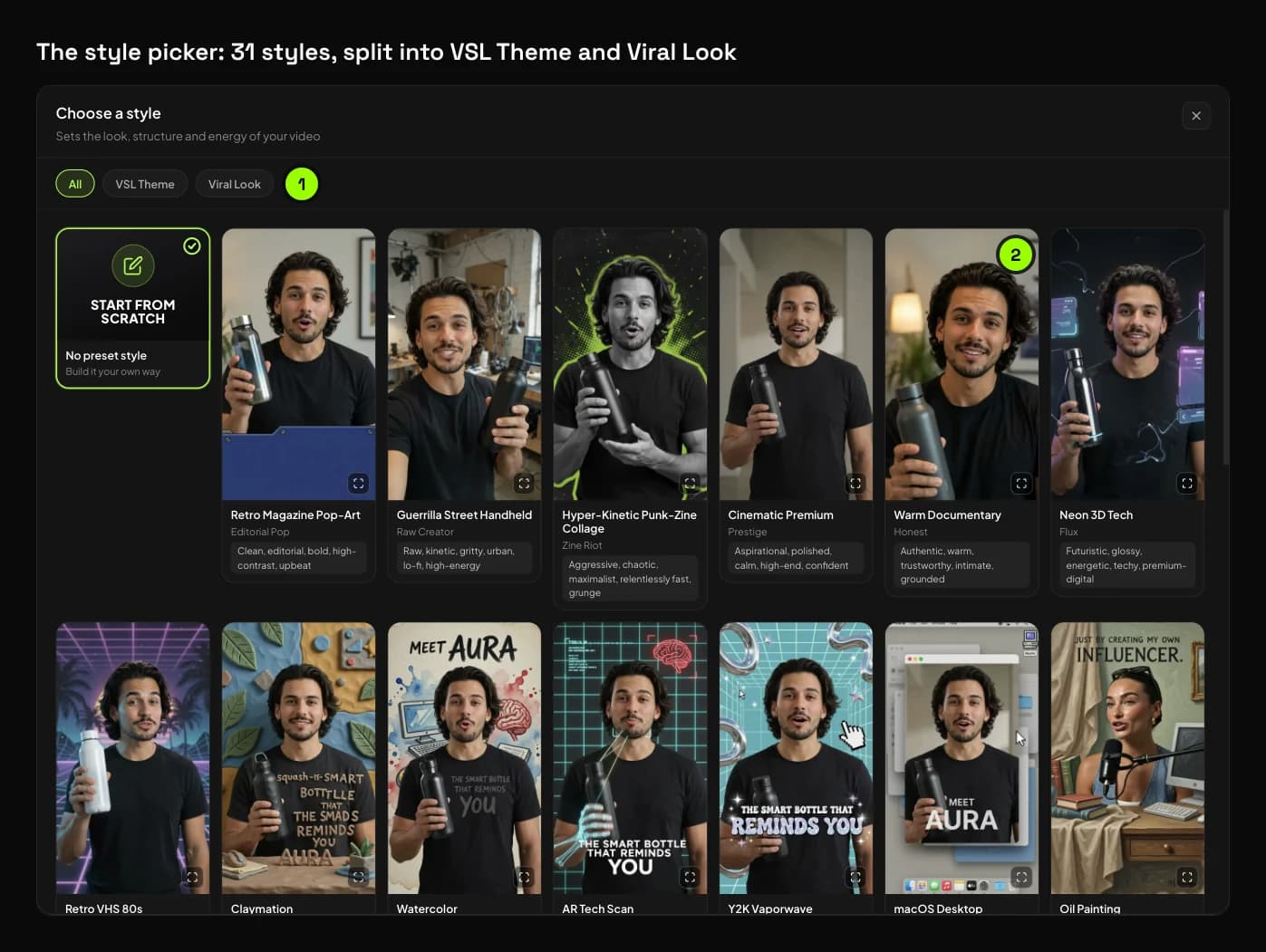
- Write the brief. One sentence is enough to start, but a VSL needs more context. Name the offer, the viewer, the length, the aspect ratio and the action you want. Pick the Sales Video template and one of its 31 styles. Attach your existing sales copy as a script, a landing page link or product photos. Type @ to attach anything already in your library.
- Choose the presenter and voice. Pick a presenter from the character library, describe a custom one, or film one short clip to build your own digital twin. Describing a new presenter means generating a portrait first, which has its own approve button. Voices come from a library of 400+ or a clone of your own. You must hold the rights to any face or voice you upload.
- Fix the plan before it renders. The storyboard comes back with every scene named and timed and the script written. Rewrite lines, swap shots or change the voice. Scripts, storyboards, voiceover, music and chat messages are free.
- Check the cost and approve. The credit cost sits on the approve button before anything renders. In confirm mode the agent stops at each step for your approval, while auto-run takes it to the finished cut. A failed generation costs nothing.
- Edit the cut by chat. Ask it to trim, reorder, re-voice, put a statistic on one scene or rewrite a line. Say "make it German" and the voice, captions and on-screen details change together.
- Export for each placement. 16:9 suits most landing pages. For the ads that send traffic there, ask for a shorter cut reframed to 9:16 or 1:1.
Here's the exact brief we used for the test below:
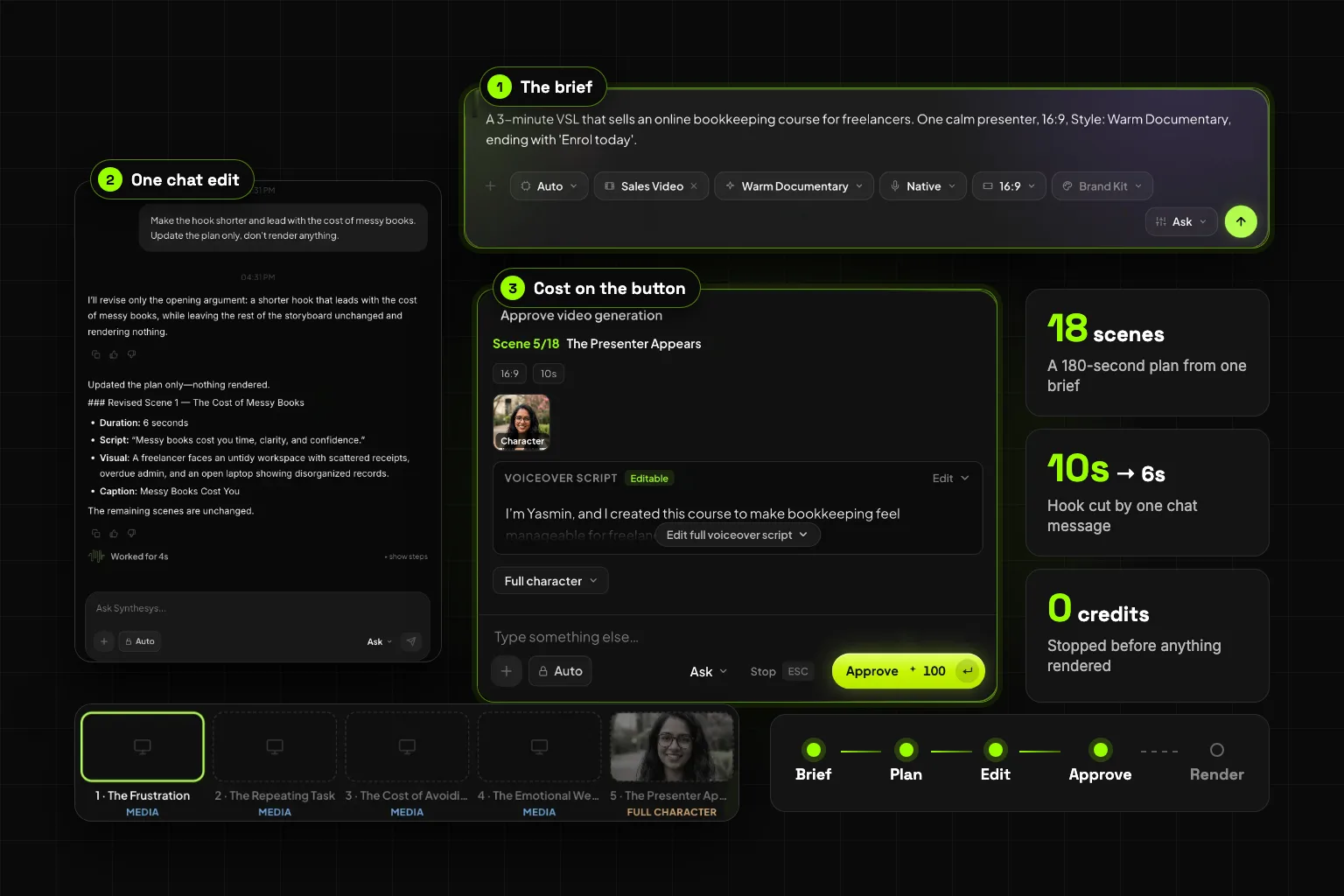
A 3-minute VSL that sells an online bookkeeping course for freelancers. One calm presenter, 16:9, Style: Warm Documentary, ending with 'Enrol today'.
What happened when we made one
We ran the brief above in the Sales Video template on 2 October 2026, in confirm mode, and stopped before anything rendered. Here is what we saw.
The template. The card is called Sales Video and shows a range of 60 seconds to 10 minutes. It offers 31 styles: 7 VSL themes and 24 viral looks. Length isn't a menu. You set it in the brief.
Timings. The agent asked who should present within 5 seconds. Describing a presenter opened an approval to generate a portrait, which we didn't approve. We picked a presenter from the library instead and told it to go on. The script and storyboard came back 49 seconds later. From the first brief to a full plan took just over 3 minutes, most of it our presenter detour.
The plan. It came back as 180 seconds: 18 scenes of 10 seconds each, 10 of footage and 8 with the presenter, and 313 words of script.
| # | Scene | Type | Length |
|---|---|---|---|
| 1 | The Frustration | Footage | 10 s |
| 2 | The Repeating Task | Footage | 10 s |
| 3 | The Cost of Avoiding It | Footage | 10 s |
| 4 | The Emotional Weight | Footage | 10 s |
| 5 | The Presenter Appears | Presenter | 10 s |
| 6 | A Practical Answer | Presenter | 10 s |
| 7 | What You Learn First | Footage | 10 s |
| 8 | The Simple System | Footage | 10 s |
| 9 | Understanding Your Numbers | Presenter | 10 s |
| 10 | Following Along | Footage | 10 s |
| 11 | From Confusion to Routine | Presenter | 10 s |
| 12 | A More Confident Workday | Footage | 10 s |
| 13 | More Time for the Work | Footage | 10 s |
| 14 | What the Course Includes | Presenter | 10 s |
| 15 | Designed for Freelancers | Footage | 10 s |
| 16 | The Shift | Presenter | 10 s |
| 17 | Take the First Step | Presenter | 10 s |
| 18 | Enrol Today | Presenter | 10 s |
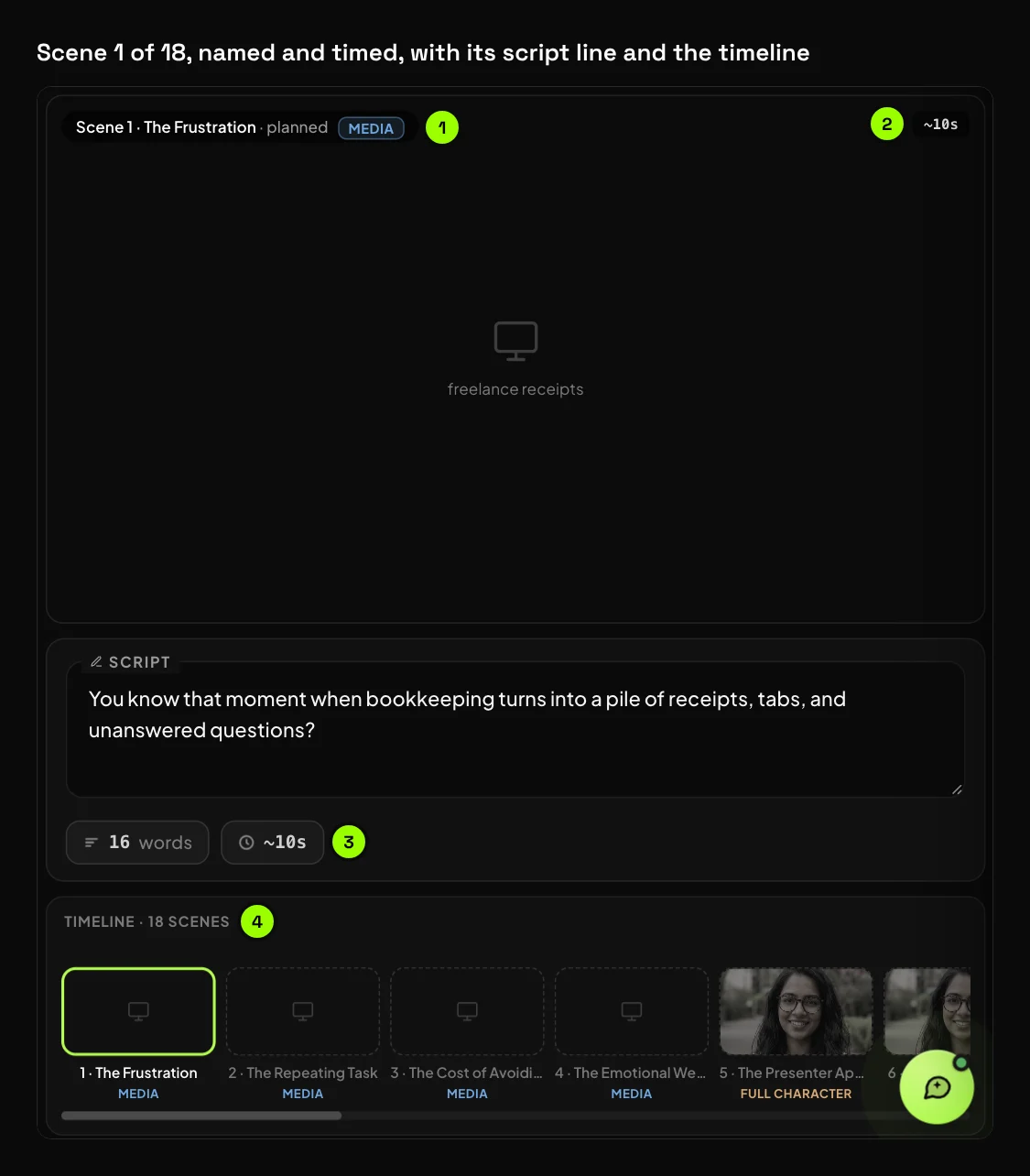
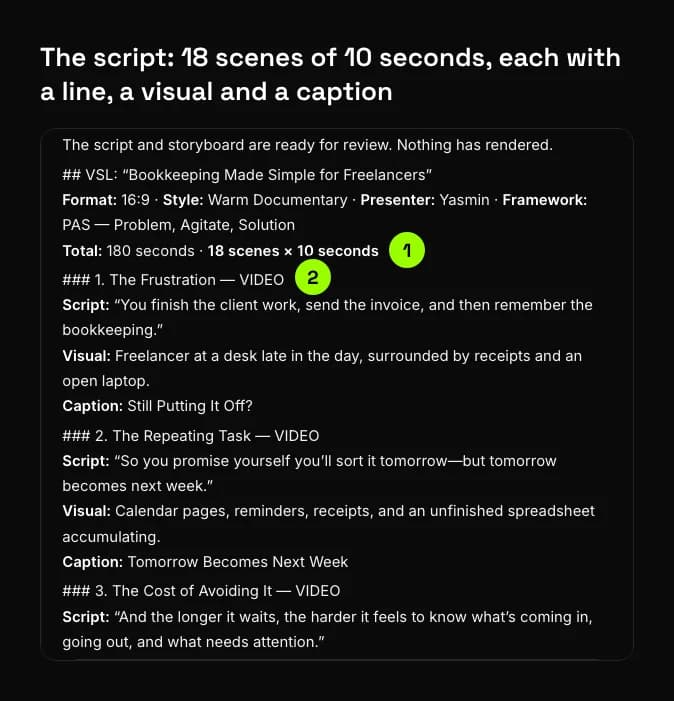
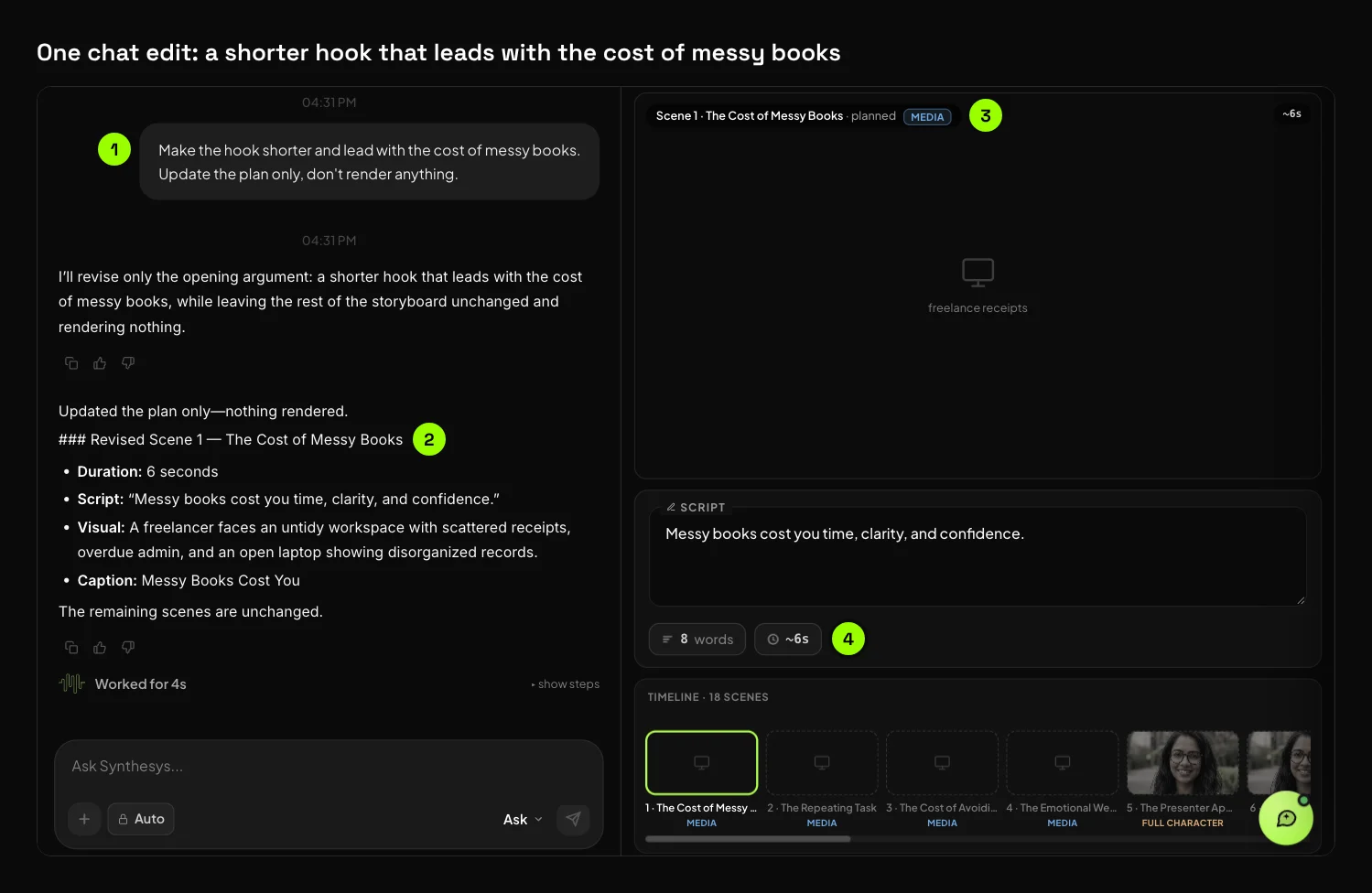
One chat edit. We typed "Make the hook shorter and lead with the cost of messy books." The agent rewrote scene 1 only, in 4 seconds of work. It became "The Cost of Messy Books", cut from 10 to 6 seconds and from 16 words to 8. The new line: "Messy books cost you time, clarity, and confidence". The other 17 scenes stayed the same, so by our count the plan dropped to 176 seconds.
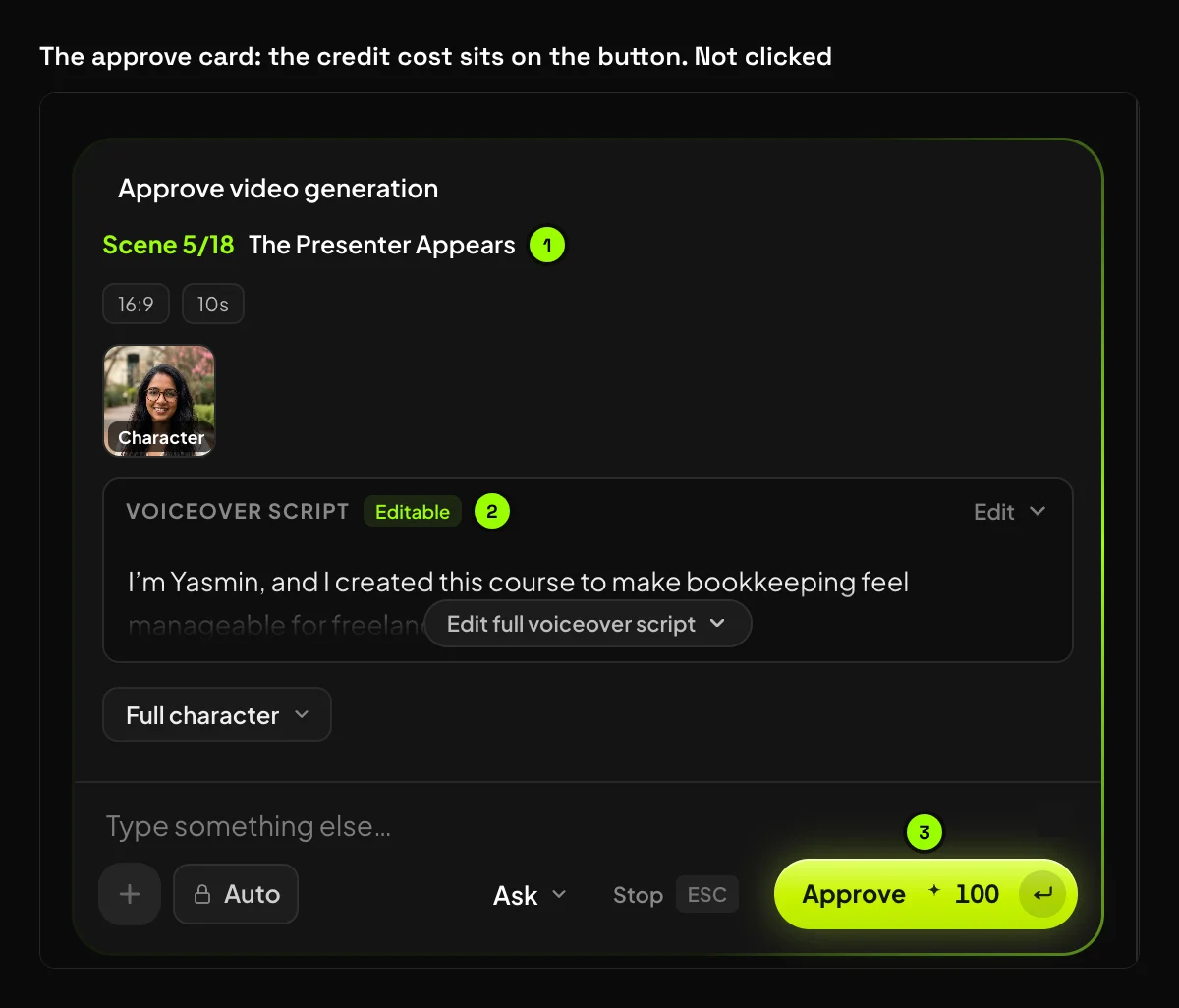
The approve button. When we asked to move on, the first approval card was for one scene, scene 5, with its credit cost on the button. We didn't click it, so nothing rendered and the test spent no credits.
What looked off.
- Two versions of the script. The chat showed one script, and the editor held a different one. The editor version is the one the approve card used. In it the presenter speaks as the course's creator: "I'm Yasmin, and I created this course". She also tells a first-person story: "I used to put it off". A stock presenter posing as the author is the kind of line the rules below warn about. Rewrite it before you approve.
- No proof and no real offer. The agent used a problem, agitate, solution structure. It never showed a result or said what the course costs, because the brief didn't say.
- Slow pace. 313 words over 180 seconds is about 105 words a minute. Read at 150, the same script lasts about 2 minutes.
- Every scene was 10 seconds. The hook only got shorter when we asked.
Before I'd approve this one, I'd rewrite the presenter lines so she isn't posing as the author. Then I'd add one real result to the proof and say what the course costs.
We didn't render the test, so there's no finished cut of it. Here's an earlier sales video made in Synthesys, 65 seconds long, that runs the full order from hook to call to action:
When does a VSL work, and when doesn't it?
A VSL suits offers that one person can decide on after one viewing, and that need more explaining than an ad allows. It suits committee decisions less well, because the video then has to persuade people who never watch it. Cold or warm traffic matters too.
That logic sits behind the checklist in Green Frog Labs' guide. It asks whether the price justifies 8 or more minutes of attention, whether traffic is warm or cold, and whether the buyer decides alone.
What rules apply to testimonials and claims in a VSL?
The same rules as any ad, and AI doesn't change them. In the US, the FTC's rule on reviews and testimonials has applied since 21 October 2024 and bans fake testimonials, including AI-generated ones. In the UK, the ASA says disclosing AI use can't fix a claim that misleads.
The FTC's final rule, announced on 14 August 2024, bans testimonials "by someone who does not exist, such as AI-generated fake reviews". It also covers testimonials that misrepresent someone's real experience. The FTC can now seek civil penalties against knowing violators.
Actors are a grey area. The FTC's Q&A on the rule says actors in an obviously fictional dramatization aren't giving testimonials. It also says "using actors to portray testimonialists could be deceptive" under the FTC Act. An AI presenter who delivers your pitch is one thing. An AI "customer" describing results nobody had is another.
Income promises need the same care, because many VSLs sell courses or business opportunities. The FTC's June 2026 guidance on earnings claims is blunt. You "must be able to support any claims you make about how much money someone can earn."
In the UK, the ASA says there's no blanket legal requirement to disclose AI in ads. But making a misleading claim and then disclaiming it with an AI label "would almost certainly be against the rules".
When customers ask me for AI testimonials, my answer is no. Use an AI presenter to deliver your pitch, and keep every result, review and "I used it" line from real customers you can name. If the presenter isn't you, don't let the script say they built the product. Our test shows why: the editor script did exactly that, and only a line-by-line read caught it.
What are the limits of making a VSL with AI?
AI takes over production, not the offer. It can't invent proof you don't have, and the script is only as strong as your brief and your edits. Longer videos take longer to render, and every claim still needs a human check before it goes live.
-
Proof stays human. Customer results, case studies and demos have to be real, for the reasons above.
-
The agent writes from what you give it. Attach your real sales copy, offer details and proof, not just one line.
-
Length and render time. The Sales Video template runs 1 to 10 minutes. Longer videos take longer to render, though rendering runs in the background.
-
Every claim needs a read. Check facts, numbers and promises in the script before you approve the render.
-
The editor can drift from the chat. In our test the chat and the editor held two different scripts. Read the lines on the approve card, because that's what renders.
The limit I hit was the script, not the video. The agent wrote a clean plan in under a minute, but it put a story in the presenter's mouth that nobody lived. Six years of building AI voice and video have taught me one thing: the tool keeps getting faster, but the brief still decides what's true.
Try it
Synthesys plans a sales video or VSL from one brief. It shows the script, storyboard and credit cost before anything renders, and you can edit the finished cut by chat. Every plan includes full commercial rights. Start a VSL in Synthesys.
Related reading:
- What is an AI video agent?
- The Synthesys AI video agent
- AI spokesperson videos
- How to write a voice-over script
- Why AI video credits get wasted
Sources
All pages opened on 2 October 2026.
- Federal Trade Commission, Federal Trade Commission Announces Final Rule Banning Fake Reviews and Testimonials, 14 August 2024
- Federal Trade Commission, The Consumer Reviews and Testimonials Rule: Questions and Answers, updated 1 May 2025
- Federal Trade Commission, Back up those earnings claims, and other lessons from the FTC's Labor Task Force work, 16 June 2026
- Advertising Standards Authority, Disclosure of AI in Advertising: Striking the Balance Between Creativity and Responsibility, 29 May 2025
- Voices.com, Words to Time Conversion Calculator
- Synthesys, AI Video Agent
- HubSpot, The Beginner's Guide to Video Sales Letters, 24 July 2026
- Vidico, What Is a VSL in Marketing? A 2026 Guide to Video Sales Letters, updated 1 October 2026
- Sendspark, Video Sales Letter Guide: Case Studies & 2026 Benchmarks, updated 24 August 2026
- Rob Palmer, What Is a VSL? The Complete Guide to Video Sales Letters, 26 February 2025
- Versely, How to Make an AI VSL (Video Sales Letter) in 2026, 13 May 2026
- Green Frog Labs, What Is a VSL? Video Sales Letters Explained with Data and Examples, updated 10 April 2026
Frequently asked questions
What does VSL stand for?
How long should a VSL be?
How many words is a 5-minute VSL script?
What is the difference between a VSL and a video ad?
Can AI make a VSL?
Can I use AI-generated testimonials in a VSL?
Keep reading
All posts →
Ad Analysis: Break Down and Rebuild Competitor Video Ads
AI Whiteboard Video: From Script to Final Cut in 6 Steps
How to Start a Faceless YouTube Channel With AI in 7 Steps